
ServiceNow Developer Sandboxes: What’s New in the Brazil Release
Faster sandbox allocation, simpler configuration, automated lifecycle management and safer parallel development: here is what ServiceNow’s Brazil release changes for developers and enterprise teams.
Picture two ServiceNow developers working on the same application. One is redesigning the employee request experience. The other is updating approval logic and integrations. Both need to test their changes, and neither wants to overwrite the other’s work.
The traditional answer is coordinating changes, managing development environments and tracking carefully what gets deployed. What if every developer could have an isolated environment ready almost instantly?
That is the promise of the latest improvements to ServiceNow Developer Sandboxes in the Brazil release. With pre-provisioned sandbox pools, automatic update set configuration and new lifecycle APIs, ServiceNow makes isolated development easier to manage and to fit into modern delivery processes.
In this article:
- Why ServiceNow development needs better isolation
- The five Brazil release improvements
- A two-developer example
- Limitations enterprises must know, and best practices
Why ServiceNow Development Needs Better Isolation
Enterprise ServiceNow environments rarely have one developer working on one feature. Several teams may build applications, configure workflows, fix defects, build integrations and test new functionality at the same time. When they share a development environment, coordination becomes essential.
1. Conflicting changes
Two developers modify the same application component. One change overwrites or interferes with the other, creating extra debugging and rework.
2. Environment availability
A developer needs a clean workspace for an urgent defect, but preparing an isolated environment introduces delays.
3. Configuration drift
A development environment gradually drifts from the base instance. Testing against outdated configuration produces misleading results.
These problems are not a sign of poor development practice. They are natural consequences of concurrent development on a complex enterprise platform. Developer Sandboxes address them with isolated development contexts tied to a base ServiceNow instance, and the Brazil release makes those environments easier to access and manage.
What’s New in ServiceNow Developer Sandboxes in the Brazil Release?
The improvements focus on five practical areas:
| Improvement | What changes |
|---|---|
| 1. Instant sandbox allocation | Pre-created sandbox pools reduce provisioning delays |
| 2. Self-service management | Dedicated Developer Sandboxes tab in App Engine Management |
| 3. Automatic update set configuration | Remote update set sources created between sandbox and base instance |
| 4. Sandbox REST APIs | Create, list, inspect and retire sandboxes programmatically |
| 5. Development tool integration | Work with Git, Build Agent and modern ServiceNow tooling |
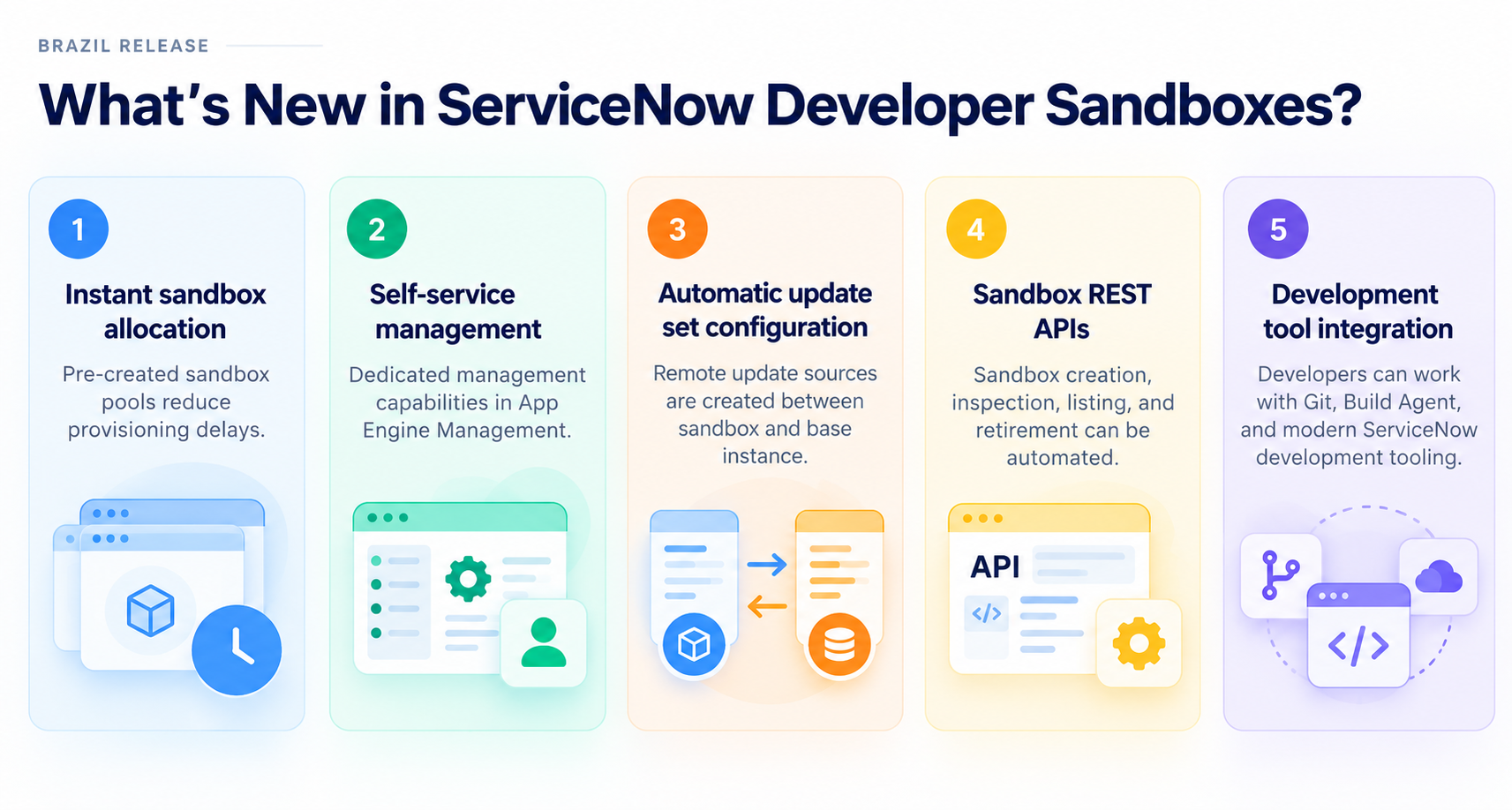
Figure 1. What’s new in ServiceNow Developer Sandboxes in the Brazil release.
Together, these make sandboxes practical temporary workspaces instead of environments that need substantial manual administration.
1. Instant Sandbox Allocation: Less Waiting, More Building
Previously, preparing a sandbox could take roughly 15 minutes to an hour, depending on the instance and its data. Brazil introduces sandbox pooling: ServiceNow keeps a pool of prepared sandboxes in the background, and a developer who needs one is allocated an available sandbox from that pool.
Why does this matter?
Example: a developer finds an urgent issue in an employee onboarding workflow. They need to reproduce the defect, test a fix and confirm it works without interfering with other development. With pooling, they get an isolated environment without the old provisioning wait. Pooling is especially useful for:
- Short development tasks and bug fixes
- Proofs of concept and experimentation
- Parallel feature development
- Isolated testing before changes are promoted
One important detail: the pool refreshes against the base instance every 24 hours, so a newly allocated sandbox may not reflect the latest base-instance changes.
Recommendation: verify relevant application versions and configuration before starting, especially when recent changes could affect the feature being tested.
2. Easier Sandbox Management from App Engine Management
Previously, initial Developer Sandbox setup required coordination with ServiceNow support. Brazil adds a dedicated Developer Sandboxes tab to the App Engine Management dashboard, where administrators can review sandbox configuration across instances, including assigned sandbox packs and their distribution. Allocation is then managed through each instance’s sandbox dashboard.
Understanding sandbox packs
- Sandbox capacity is organized into packs
- A pack is the smallest assignable unit and cannot be split across instances
- The Brazil Developer Passport demonstration described a limit of three packs per instance and an introductory trial pack for customers
Confirm your current entitlement and commercial terms before implementation.
Roles and responsibilities
| Role | Typically | Can |
|---|---|---|
| Sandbox Manager | Team lead or instance manager | Allocate sandboxes to developers |
| Sandbox User | Developer | Access an allocated sandbox |
This lets teams delegate day-to-day allocation while keeping central oversight. However, an assigned sandbox owner is not an exclusive security boundary. Access depends on the users and roles inherited when the sandbox is created, so design sandbox governance around actual permissions, not ownership labels.
3. Automatic Update Set Configuration: Smoother Change Management
Isolation solves only part of the problem. Developers also need a reliable way to move finished work. When a sandbox is created or allocated, ServiceNow now automatically configures remote update set sources between the sandbox and its base instance. Previously, developers might have had to export and import update sets manually.
How does it work?
- The developer completes an update set in the sandbox
- The base instance retrieves the completed changes through the configured remote source
- Standard validation still applies: preview, resolve conflicts, commit
- Changes then follow the existing release process
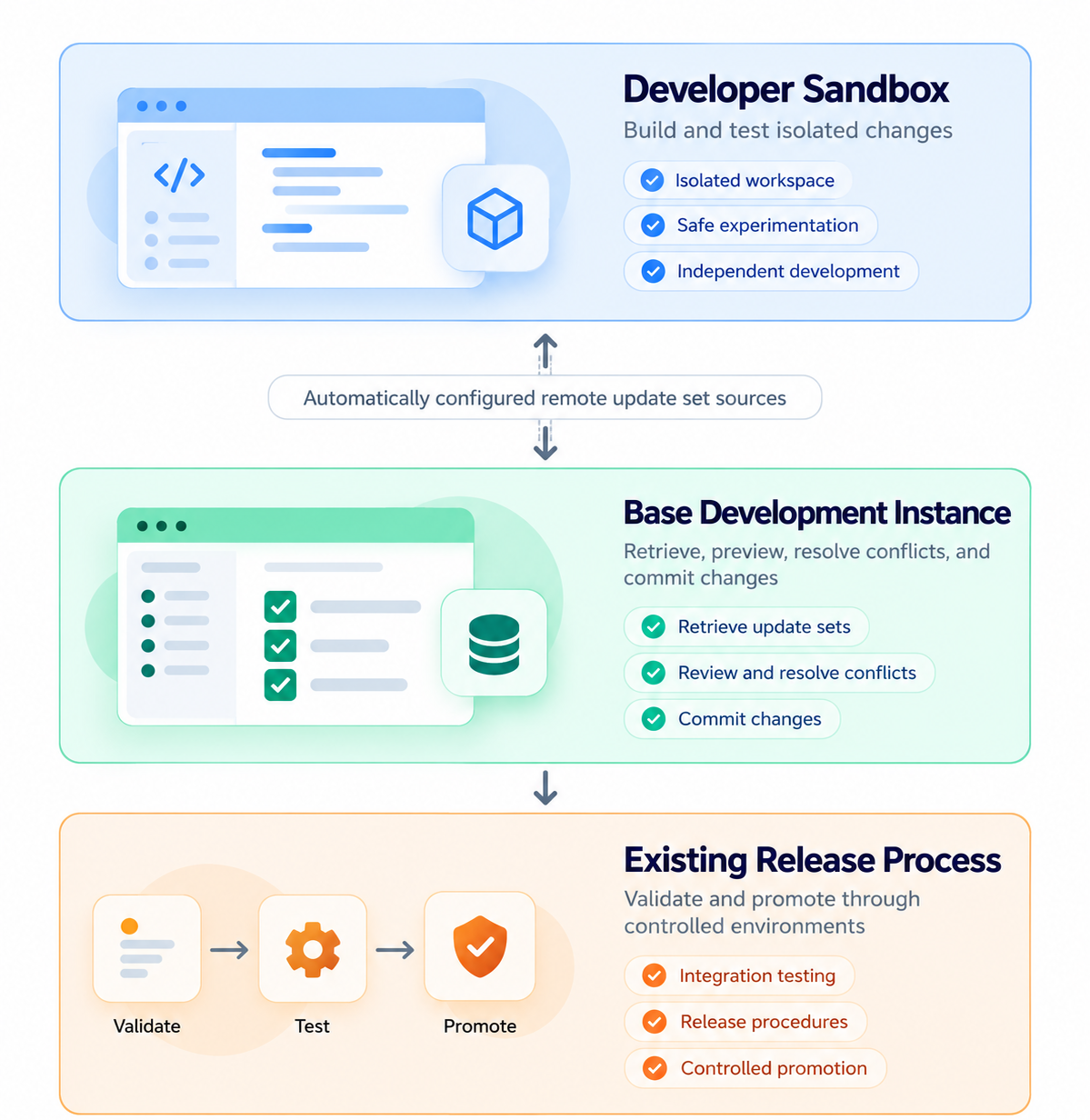
Figure 2. Development flow using automatically configured sandbox update set sources.
The same connection can bring base-instance changes into the sandbox. Teams using Git can also connect individual sandboxes to branches, so isolated development works with repository-based workflows.
The benefit is less manual environment configuration, not the removal of release controls.
4. New REST APIs: Automating the Sandbox Lifecycle
Strategically, the most important improvement is the new sandbox management REST APIs. Brazil adds programmatic operations to:
- Create a sandbox
- List existing sandboxes
- Retrieve sandbox details
- Check the status of creation or retirement operations
- Retire a sandbox
From manual requests to automated environments
Example: a developer starts a new feature. An automation requests a sandbox. The developer completes the work and runs the relevant tests. Once the work is integrated, the sandbox is retired. This can become part of a larger CI/CD workflow, such as the one in our article on ServiceNow CI/CD with Now SDK and GitHub Actions.
The APIs also open the door to MCP-compatible tools and AI development assistants, for example an orchestration layer that requests a sandbox as part of a developer’s workflow.
This does not mean ServiceNow provides a complete sandbox-to-production pipeline. Teams still design their integrations, error handling, permissions and release gates. But the foundation for lifecycle automation is now in place.
5. Better Support for AI-Assisted Development
Brazil also expands ServiceNow’s AI-assisted development ecosystem, and sandboxes fit that direction. Build Agent can be available inside sandboxes when the required capabilities are entitled and installed on the base instance.
That combination matters: developers can experiment with AI-assisted changes in an isolated environment instead of affecting other work in progress. AI-generated logic still needs review and testing, and a sandbox is a more controlled place for that work.
The larger opportunity combines four pieces, each solving a different problem:
- AI-assisted development reduces repetitive work
- Isolated workspaces reduce interference between parallel changes
- Automated testing supports quality (see ServiceNow Automated Testing with Now SDK and ATF)
- Controlled deployment protects production
A Realistic Example: Two Developers, One ServiceNow Application
An enterprise is improving its employee service application. Two developers work in parallel:
- Allocate separate sandboxes: each developer gets an isolated workspace from the pool
- Develop independently: both implement and test their changes without modifying each other’s isolated metadata
- Integrate changes: completed work is retrieved through update sets or the team’s Git workflow; conflicts are reviewed and resolved
- Validate and retire: the team completes integration testing, follows release procedures and retires the temporary sandboxes
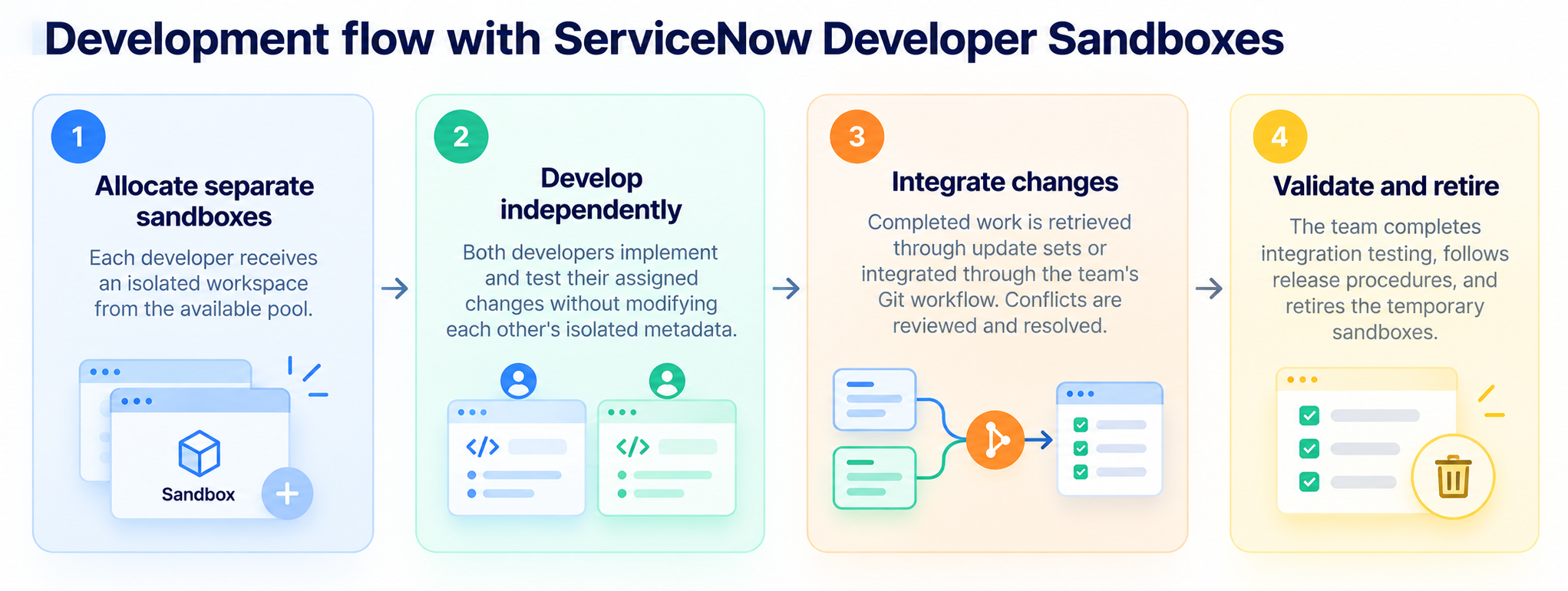
Figure 3. Development flow with ServiceNow Developer Sandboxes.
The result: fewer environment dependencies and clearer separation of work. Sandboxes reduce certain conflicts; they do not eliminate integration conflicts, shared-data effects or the need for testing.
What Enterprises Must Know Before Adopting Developer Sandboxes
The enhancements are promising, but there are practical limitations to understand.
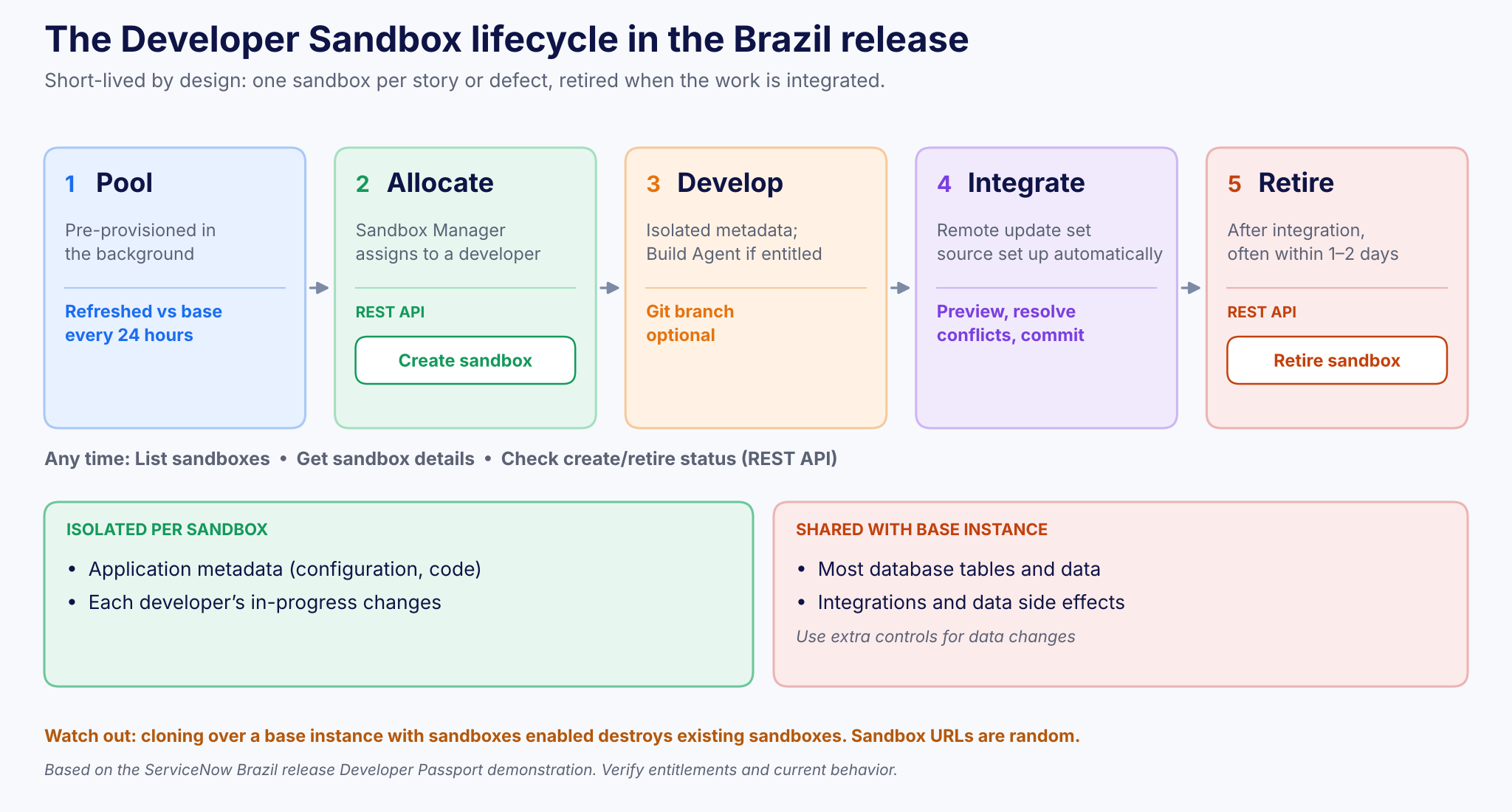
Figure 4. The sandbox lifecycle, the REST API operations, and what is isolated versus shared.
| Limitation | What it means | What to do |
|---|---|---|
| Not fully independent instances | Metadata is isolated; most database tables are shared with the base instance | Add controls for data changes, integrations and destructive operations |
| Designed to be short-lived | Recommended per story or defect, often retired within a day or two | Avoid long-running sandboxes that drift |
| Cloning destroys sandboxes | Cloning over a base instance with sandboxes enabled destroys them | Preserve changes and retire sandboxes before scheduled clones |
| Removed functionality | Data generation profiles and templates are no longer available | Plan an alternative test-data strategy |
| Random sandbox URLs | URLs do not match display names | Do not rely on predictable URL patterns in scripts |
| Entitlements apply | An entitled capability; capacity needs configuration | Verify availability, packs, licensing and release requirements |
Best Practices for a Successful Developer Sandbox Strategy
- Start with one development team: pick a small project with independent workstreams and see how sandbox allocation fits the team’s workflow.
- Use a sandbox per story or defect: do not treat temporary sandboxes as permanent personal environments.
- Validate the starting configuration: check that the sandbox has the application versions and dependencies the task needs.
- Define change integration: decide when developers use update sets, Git branches and automated validation (see our source-code development model).
- Protect shared data: document which metadata is isolated and which data or integrations remain shared.
- Automate gradually: get sandbox creation and retirement reliable before connecting them to CI/CD or AI orchestration.
- Measure the improvement: track environment preparation time, integration issues, rework and developer feedback.
The goal is not to maximize the number of sandboxes. It is to make development more predictable, independent and efficient.
The Teiva Perspective: Better Environments Create Better Development Workflows
At Teiva Systems, we see development environment management as an essential part of enterprise ServiceNow delivery. Teams need more than powerful build tools. They need environments that support concurrent work, controlled experimentation, repeatable testing and reliable change integration.
The Brazil release moves Developer Sandboxes closer to that model:
- Instant allocation reduces setup delays
- Automatic update set configuration simplifies change movement
- REST APIs enable lifecycle automation
The next step is to evaluate how short-lived sandboxes fit your architecture, source control strategy, testing model and governance requirements.
Key Takeaways
- Faster allocation: pre-provisioned pools remove the old provisioning delay
- Simpler management: App Engine Management gives direct control over sandbox configuration and capacity
- Easier integration: remote update set sources are configured automatically
- Lifecycle automation: REST APIs support creating, listing, inspecting and retiring sandboxes
- AI development support: sandboxes can host eligible Build Agent workflows
- Know the limits: metadata isolation is not data isolation; short-lived sandboxes need governance
Frequently Asked Questions
What are ServiceNow Developer Sandboxes?
Isolated development environments associated with a ServiceNow base development instance. They let developers work on application changes with reduced risk of interfering with one another.
What is new in the Brazil release?
Pre-provisioned sandbox pooling, management through App Engine Management, automatic remote update set source configuration, and REST APIs for lifecycle management.
Can multiple developers use separate sandboxes?
Yes. Teams can allocate individual sandboxes for parallel development, subject to available capacity and access permissions.
Do Developer Sandboxes have separate databases?
Not fully. They primarily isolate metadata while sharing most database tables with the base instance.
Can sandboxes be integrated with CI/CD?
Yes. The lifecycle REST APIs and existing development tooling make it possible to automate sandbox provisioning and retirement as part of a wider CI/CD process. Teams must implement the integration and validation steps.
Are Developer Sandboxes a replacement for test or staging environments?
No. They are intended for short-lived development work, not as a replacement for structured non-production testing and release environments.
The Future of ServiceNow Development Is More Isolated, Automated and Flexible
The most valuable development improvements are not always the ones that generate the most code. Sometimes they remove the friction around development itself, and that is exactly what Developer Sandboxes in the Brazil release do.
Developers get environments faster, work more independently, integrate changes with less manual configuration and automate more of the sandbox lifecycle. For enterprises, it is a chance to rethink how development environments support collaboration and delivery.
Faster development is not just about writing code faster. It is about removing the obstacles that slow developers down.
Ready to modernize your ServiceNow development workflow? Talk to Teiva Systems about a development strategy that combines isolated environments, automation, testing and reliable enterprise delivery.
Kostya Bazanov, Managing Director, Nov 11, 2026
Eager to take the next step? Contact us today!
Latest Articles
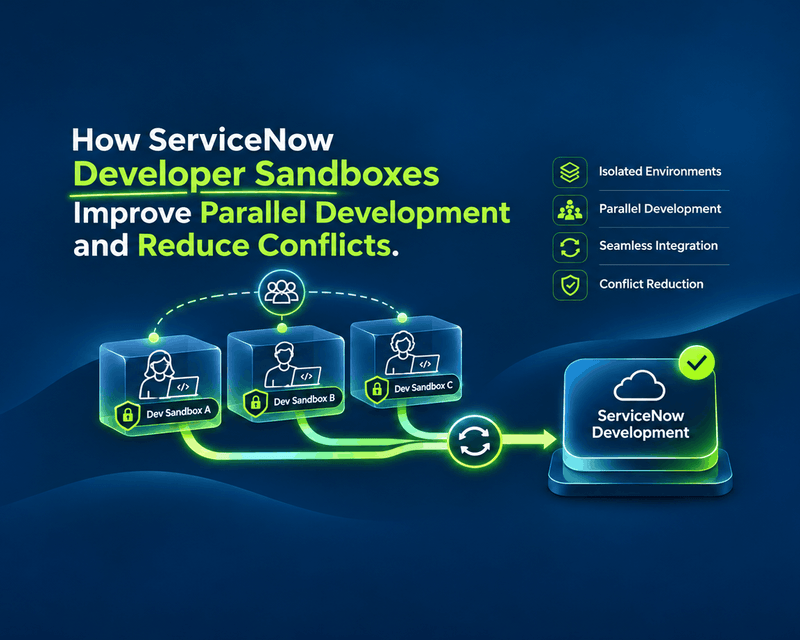
How ServiceNow Developer Sandboxes Improve Parallel Development and Reduce Conflicts
What happens when five developers work on the same ServiceNow application at once? One updates a business rule. Another modifies a workflow. A third adds an integration. Meanwhile, someone is fixing a critical production issue.
read more
ServiceNow Lux: How the New AI-First UI Framework Changes Application Development
ServiceNow Lux: How the New AI-First UI Framework Changes Application Development AI is no longer just a feature inside enterprise software. It is becoming part of the interface itself. For years, ServiceNow developers have built applications around forms, workspaces, dashboards and structured workflows. AI arrived as add-ons: search, record summaries, automation of specific tasks. ServiceNow […]
read more
Teiva Systems at ServiceNow Developer Meetup Munich: Exploring AI-Powered Platform Operations
On October 29, 2026, Teiva Systems participated in the ServiceNow Developer Meetup (SNUG) in Munich, hosted by Agineo. The event brought together ServiceNow developers, architects, and technology enthusiasts to explore the latest platform innovations, AI-powered automation, and the future of autonomous ServiceNow operations.
read more