
ServiceNow Developer Sandboxes and CI/CD: Automating Development Environments with REST APIs
What if every ServiceNow development task could start with its own isolated environment, connect to a CI/CD pipeline, and disappear when the work is done?
No waiting for environment setup. No developers overwriting each other’s changes. No avoidable conflicts slowing releases. That is the direction ServiceNow Developer Sandboxes are taking development workflows.
With sandbox lifecycle REST APIs in the ServiceNow Brazil release, teams can stop managing development environments by hand and treat them as programmable resources. Combined with Git, GitHub Actions, Azure DevOps and ServiceNow’s native CI/CD APIs, sandboxes open the way to faster, more predictable and scalable delivery.
In this article:
- Why shared development environments slow teams down
- The new Brazil release sandbox lifecycle APIs
- A seven-step sandbox-based CI/CD pipeline
- Working with ServiceNow CI/CD REST APIs, plus best practices
Why Traditional ServiceNow Development Environments Slow Teams Down
Many ServiceNow teams rely on shared development instances. That works for small teams, but problems grow with development activity.
Example: three developers work on the same ServiceNow application:
- Developer A is implementing a new approval workflow
- Developer B is updating an integration
- Developer C needs to deploy an urgent production bug fix
All three change one shared environment. Even with source control, overlapping configuration, shared dependencies and competing deployments create friction:
- Development conflicts
- Delayed testing
- More manual coordination
- Slower releases
Traditional environments force teams to organize work around infrastructure availability instead of delivery priorities. Developer Sandboxes offer a different approach: isolated workspaces, with the wider development process still connected.
What Are ServiceNow Developer Sandboxes?
ServiceNow Developer Sandboxes are isolated development environments associated with a non-production ServiceNow instance. Each sandbox is an independent space for building, configuring and testing changes without interfering with other developers.
Unlike Personal Developer Instances (PDIs), which are mainly for individual learning and experimentation, Developer Sandboxes support coordinated enterprise development from a controlled base-instance configuration. Core capabilities:
- Isolated development: separate changes without overwriting one another
- Parallel execution: features, bug fixes and experiments progress at the same time
- Git integration: branch-based source control workflows
- Lifecycle management: allocate, monitor and retire sandboxes
- Consistent starting points: sandboxes inherit metadata from the base development instance
An important distinction: sandbox isolation mainly concerns application metadata and development changes. It does not mean every sandbox gets a fully independent copy of all database records.
The Brazil Release: Making Sandboxes API-Driven
The Brazil release introduces programmatic management of the Developer Sandbox lifecycle through REST APIs. Previously, sandbox management relied more on administrative workflows. Now automation tools can work with the lifecycle directly:
| Operation | Purpose |
|---|---|
| 1. Create sandbox | Allocate a development workspace programmatically |
| 2. List sandboxes | Retrieve available and active sandbox information |
| 3. Get sandbox details | Inspect a specific sandbox and its status |
| 4. Check operation status | Track asynchronous creation or retirement operations |
| 5. Retire sandbox | Release an environment after development is complete |
Brazil also introduces pooled sandbox allocation, which keeps ready-to-use capacity to reduce provisioning delays.
That changes what CI/CD can do. A development environment is no longer only a manually assigned resource; it can be part of an automated workflow. Example: a pipeline allocates a sandbox when a developer starts a feature, uses it to validate changes and retires it after the work is safely merged.
Environments follow the work, not the other way around.
How Developer Sandboxes Fit into a CI/CD Pipeline
The real value appears when sandbox lifecycle automation connects to source control and continuous integration. A typical workflow:
- Feature development begins: a developer creates a feature branch in GitHub or Azure Repos; it becomes the reference point for the task.
- A sandbox is allocated: automation calls the sandbox lifecycle API and tracks the operation until the environment is ready.
- Changes are developed: the developer syncs the application code and works in the isolated sandbox while others continue independently.
- Automated validation runs: when a pull request opens, the pipeline starts supported checks, including Automated Test Framework (ATF) tests and Instance Scan.
- Changes are reviewed and merged: the pull request passes required reviews and quality gates and is merged into the integration branch.
- The application moves through delivery: the validated version is published to the Application Repository and installed downstream through supported CI/CD APIs.
- The sandbox is retired: once the work is safely preserved, the temporary environment is released.
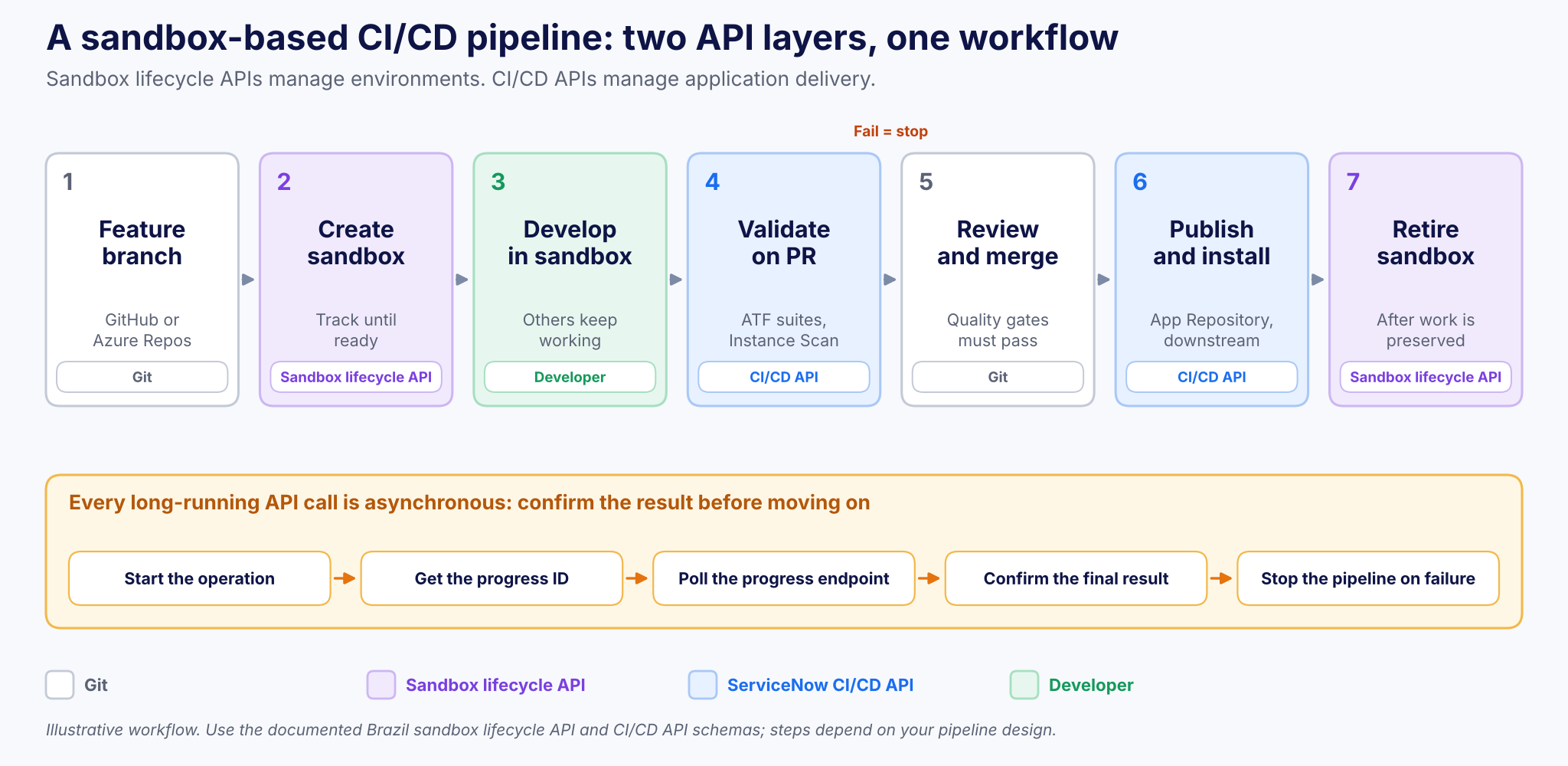
Figure 1. A sandbox-based CI/CD pipeline: two API layers, one workflow.
The workflow combines two automation layers: sandbox lifecycle APIs for managing environments and ServiceNow CI/CD APIs for managing application delivery. Together, they make automated development environments practical.
Working with ServiceNow REST APIs
ServiceNow’s native CI/CD API integrates with external automation tools. It supports:
- Applying or importing changes from source control
- Publishing application versions
- Installing applications from the Application Repository
- Running ATF test suites
- Executing Instance Scan checks
- Monitoring asynchronous operations and their results
Example: installing an application from the Application Repository
curl –request POST \
“$INSTANCE_URL/api/sn_cicd/app_repo/install?sys_id=$APP_SYS_ID” \
–header “Accept: application/json” \
–header “Authorization: Bearer $SN_ACCESS_TOKEN”
- INSTANCE_URL: the target ServiceNow instance
- APP_SYS_ID: the application’s sys_id
- SN_ACCESS_TOKEN: a token from your secrets store, never hard-coded
The request starts installing an application already published to the connected Application Repository.
Handle asynchronous operations
A successful initial request does not mean the installation has finished. The API can return a progress identifier the pipeline must monitor. A reliable pipeline needs to:
- Start the requested operation
- Retrieve its progress identifier
- Poll the documented progress endpoint
- Confirm the final result
- Stop the pipeline if the operation fails
For sandbox creation and retirement, use the separate Brazil sandbox lifecycle API and its documented request and response schema. Sandbox provisioning and application deployment are related, but they are not the same operation.
GitHub Actions and Azure DevOps: Connecting the Pipeline
Both GitHub Actions and Azure DevOps can orchestrate ServiceNow REST API operations. The implementation depends on your repository structure, security model and deployment strategy. A practical pipeline has three stages (see also ServiceNow CI/CD with Now SDK and GitHub Actions):
| Stage | What happens | API layer |
|---|---|---|
| 1. Environment preparation | Check capacity, request a sandbox, verify it is ready before use | Sandbox lifecycle API |
| 2. Continuous integration | Run tests, ATF suites, static checks and Instance Scan; block promotion on failure | CI/CD API |
| 3. Delivery and cleanup | Publish or install after approvals; retire the sandbox once work and test evidence are preserved | CI/CD API, then sandbox lifecycle API |
Stage 1: Environment preparation
The pipeline checks whether sandbox capacity is available. If a new environment is needed, it requests allocation through the lifecycle API. Automation should verify the sandbox is ready before sending development or test operations to it.
Stage 2: Continuous integration
After changes are committed, the pipeline starts validation: application-specific automated tests, ATF suites, static quality checks and Instance Scan. It collects results and blocks promotion if a required quality gate fails, so failed changes never progress automatically into shared environments (see ServiceNow Automated Testing with Now SDK and ATF).
Stage 3: Continuous delivery and cleanup
Once changes pass validation and get the necessary approvals, the pipeline publishes or installs the application through the supported deployment mechanism, then retires the temporary sandbox. Clean up only after confirming changes are preserved and any required test evidence is collected.
The outcome: a repeatable development process with fewer manual environment-management steps.
Five Best Practices for Sandbox-Based CI/CD
Automation speeds up development only when the environment lifecycle is designed carefully.
1. Keep sandboxes short-lived
Sandboxes are meant to be temporary. Long-running ones drift from the base-instance configuration and cause integration problems later. Align sandbox lifetimes with individual stories, defect fixes or short testing cycles.
2. Use a branch-per-task strategy
Connect work to clearly defined branches, and avoid treating sandboxes as permanent personal environments. Each task needs an identifiable branch, owner and promotion path.
3. Validate before promotion
A passing local test does not guarantee correct behavior in a shared environment. Run automated checks before merging, and repeat integration testing after promotion.
4. Secure API access
- Use appropriately scoped automation identities and secrets management
- Never store credentials in repositories or pipeline definitions
- Apply least privilege and restrict lifecycle operations to authorized identities
5. Automate cleanup, not just creation
A pipeline that creates environments without retiring them is incomplete. Track ownership, activity and lifecycle state so inactive environments can be found and safely retired, always accounting for unfinished work.
Where Sandbox Automation Delivers the Most Value
Parallel application development
Several developers work on separate features or components without conflicting changes.
Urgent production fixes
A developer fixes a critical defect in a separate sandbox while feature development continues.
ServiceNow Store product development
ISVs maintaining several applications or product versions test changes in isolated workspaces before moving them through governed delivery pipelines.
Automated integration testing
Dedicated environments support short testing cycles for application changes and integrations, subject to appropriate data and dependency configuration.
AI-assisted development
AI coding tools and agent-driven workflows can use sandbox lifecycle APIs within a controlled process. Example: an authorized AI development agent requests an isolated workspace, performs permitted development work, starts tests and reports results for human review. Production deployments and other high-impact actions should stay behind explicit authorization and approval controls.
The Bigger Picture: Environments as Part of the Delivery Pipeline
The important change is not that ServiceNow offers more REST endpoints. It is that development environments become programmable parts of the delivery process.
| Traditional model | Automated model |
|---|---|
| Teams plan work around available environments | The pipeline provisions environments around the work |
| Manual allocation and cleanup | API-driven creation, validation and retirement |
| Shared instance, frequent conflicts | Isolated sandbox per task, merge through Git |
This reduces environment bottlenecks, improves isolation, standardizes validation and supports more consistent releases. Developer Sandboxes do not replace shared integration environments, release governance or production deployment controls. They strengthen the earlier stages of the software development lifecycle.
Key Takeaways
- Brazil release REST APIs let pipelines create, list, inspect, track and retire sandboxes
- Pooled allocation keeps ready-to-use sandbox capacity
- Two API layers: sandbox lifecycle API for environments, CI/CD API for delivery
- CI/CD operations are asynchronous: poll, confirm and stop on failure
- GitHub Actions or Azure DevOps can orchestrate the full pipeline
- Keep sandboxes short-lived, secure API access and automate cleanup
Frequently Asked Questions
Can ServiceNow Developer Sandboxes be created through an API?
Yes. The Brazil release adds sandbox lifecycle REST APIs to create, list, inspect, check the status of and retire sandboxes.
Is the sandbox lifecycle API the same as the ServiceNow CI/CD API?
No. The sandbox lifecycle API manages development environments. The CI/CD API manages application delivery: source control, publishing, installing, ATF tests and Instance Scan.
Which CI/CD tools can orchestrate ServiceNow sandboxes?
Tools that call REST APIs, such as GitHub Actions and Azure DevOps, can orchestrate sandbox and CI/CD operations. Implementation depends on your repository structure, security model and deployment strategy.
Why must pipelines poll ServiceNow CI/CD operations?
Many operations are asynchronous. A successful request does not mean the operation finished, so the pipeline should poll the progress endpoint, confirm the result and stop on failure.
Final Thoughts: From Manual Environments to Automated Development
ServiceNow Developer Sandboxes and REST-based CI/CD offer a practical path to more scalable development. By combining isolated workspaces, Git, automated testing, deployment APIs and lifecycle management, teams cut unnecessary coordination and make development more repeatable. The Brazil release moves this model forward by making sandbox creation and retirement available through APIs.
The next step in ServiceNow DevOps is not only automating how applications are deployed. It is automating the environments in which they are built.
At Teiva Systems, we help organizations and ServiceNow ISVs design development workflows, implement CI/CD automation and build scalable applications on the ServiceNow AI Platform.
Looking to modernize your ServiceNow development process? Talk to Teiva Systems about how Developer Sandboxes, REST APIs and automated delivery pipelines can help your team build faster, test more confidently and release with greater control.
Oleksii Konakhovych, CTO, Nov 13, 2026
Eager to take the next step? Contact us today!
Latest Articles
ServiceNow Developer Sandboxes: What’s New in the Brazil Release
Faster sandbox allocation, simpler configuration, automated lifecycle management and safer parallel development: here is what ServiceNow’s Brazil release changes for developers and enterprise teams.
read more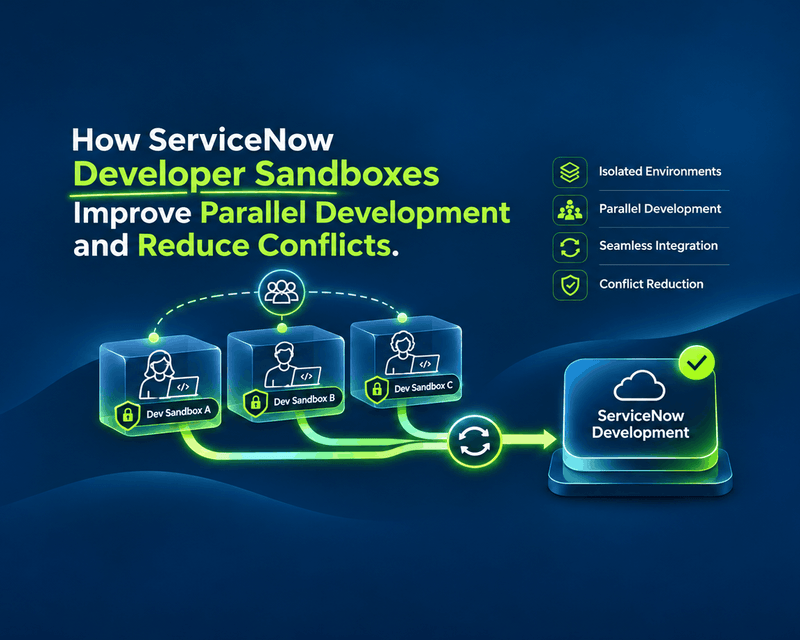
How ServiceNow Developer Sandboxes Improve Parallel Development and Reduce Conflicts
What happens when five developers work on the same ServiceNow application at once? One updates a business rule. Another modifies a workflow. A third adds an integration. Meanwhile, someone is fixing a critical production issue.
read more
ServiceNow Lux: How the New AI-First UI Framework Changes Application Development
ServiceNow Lux: How the New AI-First UI Framework Changes Application Development AI is no longer just a feature inside enterprise software. It is becoming part of the interface itself. For years, ServiceNow developers have built applications around forms, workspaces, dashboards and structured workflows. AI arrived as add-ons: search, record summaries, automation of specific tasks. ServiceNow […]
read more