

ServiceNow Lux: How the New AI-First UI Framework Changes Application Development
AI is no longer just a feature inside enterprise software. It is becoming part of the interface itself.
For years, ServiceNow developers have built applications around forms, workspaces, dashboards and structured workflows. AI arrived as add-ons: search, record summaries, automation of specific tasks.
ServiceNow Lux signals a different direction. Introduced as a new AI-native UI framework in the ServiceNow Brazil release, Lux brings AI into the foundation of enterprise applications. Instead of treating conversational experiences as a separate layer, it creates an architecture where traditional interfaces and AI-powered interactions work together.
For developers, this is more than a visual redesign. It brings new technologies, new development workflows and a chance to rethink how users interact with enterprise applications.
In this article:
- What ServiceNow Lux is and why ServiceNow built it
- The core technologies: Lit web components, AI-native experiences, a unified shell
- How LuxLab changes the development process
- What happens to Workspaces and Service Portal
- Five things development teams should do now
What Is ServiceNow Lux?
ServiceNow Lux is an AI-native UI framework for building intelligent application experiences on the ServiceNow AI Platform.
Traditional enterprise applications follow a predictable model: open a page, navigate menus, complete forms, trigger workflows. Lux expands that model by making AI a native part of the user experience.
Three things define it:
- A common application shell that brings together navigation, search, notifications and application content
- Coexistence: existing applications and workspaces run within this broader experience, so nothing has to be replaced at once
- Modern web technology: Lit-based web components, moving beyond older frontend approaches such as AngularJS
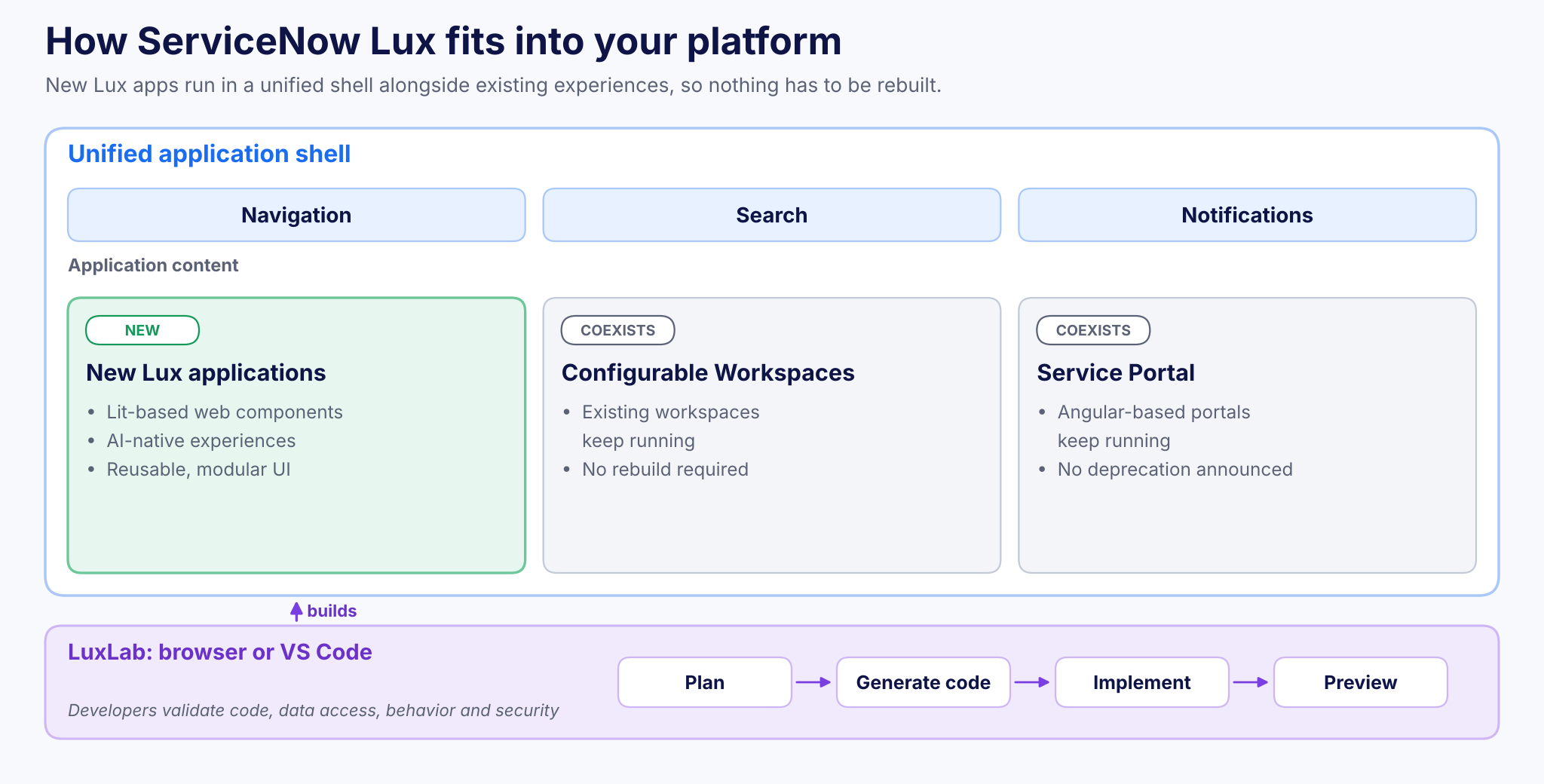
Figure 1. How ServiceNow Lux fits into your platform: new apps, existing experiences and LuxLab tooling.
The goal is not just a more modern look. It is a foundation where users combine direct actions, contextual information and conversational AI in one environment.
Why ServiceNow Is Moving Toward an AI-First Interface
Enterprise software has traditionally required users to understand how an application is organized before they can complete a task.
Example: resolving an IT incident today
A service desk agent typically has to:
- Open the incident record
- Review related assets
- Search knowledge articles
- Check previous incidents
- Update several fields
With AI, the agent could instead ask an assistant to investigate the incident, surface the relevant information and recommend the next action.
Making that reliable takes more than connecting a chatbot to an existing interface. Applications need contextual interactions, reusable components, structured data and human oversight.
Lux reflects ServiceNow’s broader move toward an AI-native platform, where intelligence, enterprise data, workflow execution and governance are designed to work together. For developers, that means thinking beyond pages and forms toward experiences that help users reach outcomes with fewer unnecessary steps.
The Core Technologies Behind ServiceNow Lux
The biggest change is the technology foundation. Lux introduces modern frontend practices that make applications more modular, maintainable and adaptable.
1. Lit-based web components
Lux is built on Lit, a lightweight JavaScript library for creating reusable web components. Unlike frameworks that depend on framework-specific structures, web components use browser standards to encapsulate interface functionality. For ServiceNow developers, this means:
- Reusable UI components: build elements once and use them across experiences
- Modular development: maintain individual components without redesigning whole pages
- Consistent interfaces: apply common patterns across multiple applications
- Modern frontend skills: work with tools and practices familiar to today’s web developers
Reusable components matter most in large ServiceNow environments, where several teams maintain applications for different business functions.
2. AI-native application experiences
Traditional interfaces are designed around predefined user journeys. Lux lets AI become part of those journeys.
Example: a procurement application could pair a traditional approval dashboard with an AI experience that explains pending requests, flags missing information and helps users prepare decisions.
The key distinction: AI participates in the application experience instead of sitting outside it as a separate assistant. Actual capabilities depend on the application, its integrations, available AI services, and the organization’s licensing and governance setup.
3. A unified application shell
Lux introduces a shared structure for navigation, search, notifications and application content. This reduces fragmentation between enterprise experiences while each application keeps its specialized functionality. For developers, a common shell also simplifies decisions about where shared interface elements belong and how users move across the platform.
How Lux Changes the ServiceNow Development Process
Lux changes not only how interfaces are rendered, but how applications are designed and built.
From manual UI construction to AI-assisted development
The Lux development experience comes in two forms: a browser-based LuxLab environment and LuxLab for Visual Studio Code. Both support an AI-assisted workflow:
- Plan the experience from the business requirement
- Generate code with AI assistance
- Implement and refine the components
- Preview the result before release
Example: a developer describes a service operations dashboard showing critical incidents, affected services and recommended resolution actions. AI-assisted tooling helps produce an initial implementation, while the developer stays responsible for validating the code, data access, behavior and security.
The goal is not to replace traditional development skills. It is to cut repetitive implementation work so developers can focus on business logic, architecture and user experience.
From static screens to contextual experiences
Traditional development often starts by defining screens and the navigation between them. An AI-first approach starts with a different question:
What is the user trying to accomplish, and what information or actions should the application make available?
Example: in a customer service application, instead of navigating between several records, an agent sees case information, customer history, knowledge recommendations and available actions together in one contextual view.
Not every application needs a conversational interface. For structured processes, forms and dashboards may remain the most efficient option. The opportunity lies in combining familiar interactions with intelligent assistance where it delivers measurable value.
What Happens to UI Builder, Workspaces and Service Portal?
The first question many ServiceNow customers ask: does Lux mean rebuilding our applications?
No. ServiceNow has indicated that Lux is intended to coexist with existing experiences, including configurable Workspaces and Angular-based Service Portals. There are currently no announced plans to deprecate them as part of the Lux introduction.
That matters for organizations with heavy investments in custom workspaces, employee portals and UI components. Instead of planning an immediate migration, teams can evaluate Lux for new applications and keep maintaining established solutions.
| Experience | Status with Lux | Recommended approach |
|---|---|---|
| New applications | Candidate for Lux | Evaluate Lux where AI-native UX adds value |
| Configurable Workspaces | Coexists; no deprecation announced | Keep maintaining |
| Service Portal (Angular) | Coexists; no deprecation announced | Keep maintaining |
Availability
- General availability: targeted for Q4 2026
- Rollout: documentation and Personal Developer Instance (PDI) access expected as part of the rollout
- Wider adoption: expected to continue into early 2027
Verify availability and feature support against the relevant ServiceNow release and your instance configuration.
Where Lux Could Deliver the Most Business Value
The biggest opportunities are in applications where users combine information, decisions and workflow execution.
IT Service Management
An incident interface could bring together affected configuration items, related incidents, diagnostic information and AI-generated recommendations, so service desk agents investigate without constantly switching screens.
Customer Service Management
Agents could work in one experience that combines case history, relevant knowledge, suggested responses and escalation actions.
Enterprise approvals
An approval application could give decision-makers policy information, request context, risk indicators and recommended actions, while keeping human authorization for sensitive decisions.
These scenarios show potential applications, not capabilities Lux delivers automatically. Their success depends on well-designed workflows, reliable enterprise data and appropriate controls.
Five Things Development Teams Should Do Now
You do not need to replace existing ServiceNow applications. But you should start preparing for AI-native development:
- Review the existing UI landscape: identify applications relying on legacy interfaces, complex customizations or fragmented user journeys.
- Build familiarity with Lit and web components: understanding component-based architecture helps developers evaluate the framework.
- Experiment with Lux development tools: explore supported preview capabilities in non-production environments, following ServiceNow’s availability guidance.
- Identify high-value AI use cases: prioritize applications where contextual assistance could reduce manual effort, improve decisions or simplify complex workflows.
- Maintain development governance: apply code review, access controls, testing and release management to AI-assisted development as rigorously as to manually developed applications.
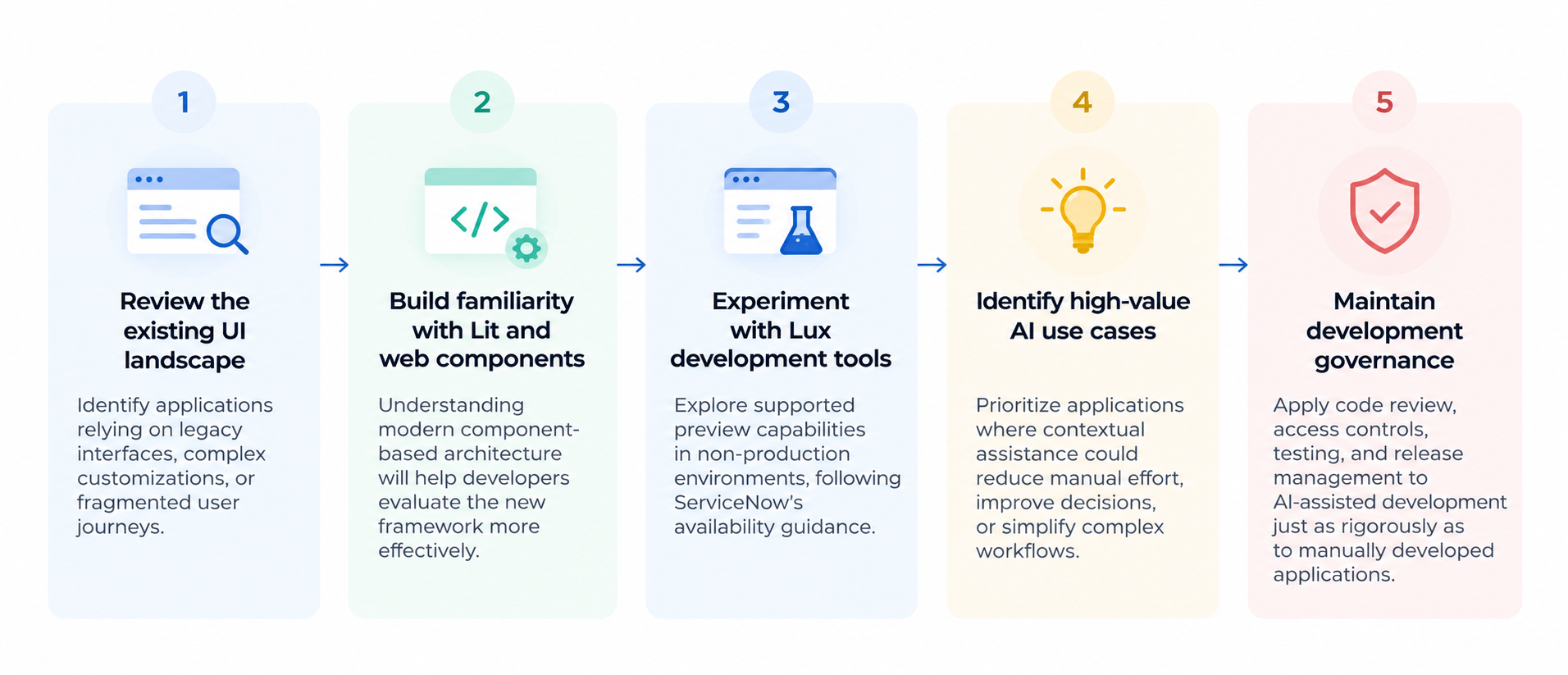
Figure 2. Five steps to prepare your team for ServiceNow Lux.
Above all, do not treat Lux as a reason to redesign every interface. Modernization should be driven by measurable business value, not framework adoption alone. Our article ServiceNow AI Agent Testing: 7 Checks Before Production covers how to validate AI-driven functionality before go-live.
The Future of ServiceNow Application Development
ServiceNow Lux is an important step toward a different model of enterprise application development. Instead of users adapting to rigid application structures, experiences can respond to user intent, business context and available workflows.
For developers, it combines modern frontend engineering, reusable components, AI-assisted development and intelligent workflow design. The fundamentals do not change:
- Security matters
- Data quality matters
- Maintainability matters
- AI-generated code still needs to be reviewed, tested and governed
The organizations that gain most from Lux will not necessarily be the first to adopt it. They will be the ones that understand where AI-native experiences genuinely simplify work and improve outcomes.
Key Takeaways
- Lux is an AI-native UI framework introduced in the ServiceNow Brazil release
- It is built on Lit-based web components inside a unified application shell
- LuxLab (browser and VS Code) supports AI-assisted plan, generate, implement and preview
- Workspaces and Service Portal coexist with Lux; no deprecation has been announced
- General availability is targeted for Q4 2026
- Start with high-value use cases and keep full development governance
Frequently Asked Questions
What is ServiceNow Lux?
An AI-native UI framework for the ServiceNow AI Platform, built on Lit-based web components and a unified application shell, that makes AI a native part of application experiences.
Do we need to rebuild existing Workspaces or Service Portals?
No. ServiceNow has indicated that Lux coexists with configurable Workspaces and Angular-based Service Portals, with no announced plans to deprecate them.
What is LuxLab?
The Lux development environment, available in the browser and as a Visual Studio Code extension, supporting an AI-assisted workflow from planning to code generation, implementation and preview.
When will ServiceNow Lux be generally available?
General availability is targeted for Q4 2026, with wider adoption expected into early 2027. Verify against the relevant ServiceNow release.
How Teiva Systems Can Help
At Teiva Systems, we help organizations design, develop, integrate and optimize ServiceNow solutions that support real business objectives. As ServiceNow introduces capabilities such as Lux, we focus on connecting platform innovation with practical implementation.
Whether you are evaluating modern UI frameworks, building custom ServiceNow applications or introducing AI-powered workflows, the right architecture and development strategy make the difference.
Planning your first Lux application? Talk to our ServiceNow team about where AI-native experiences can deliver value for your users.
Slava Trotsenko, CEO, Nov 05, 2026
Eager to take the next step? Contact us today!
Latest Articles

Teiva Systems at ServiceNow Developer Meetup Munich: Exploring AI-Powered Platform Operations
On October 29, 2026, Teiva Systems participated in the ServiceNow Developer Meetup (SNUG) in Munich, hosted by Agineo. The event brought together ServiceNow developers, architects, and technology enthusiasts to explore the latest platform innovations, AI-powered automation, and the future of autonomous ServiceNow operations.
read more
ServiceNow Playbooks as MCP Tools: Connecting Enterprise Workflows to AI Assistants
Imagine an employee opening Claude, describing a business trip, attaching a receipt and asking for reimbursement. No switching applications. No hunting for the right ServiceNow form. No typing the same information twice.
read more
ServiceNow Lux vs UI Builder and Service Portal: What Enterprises Need to Know
Does Lux replace UI Builder or Service Portal? Short answer: no. The full answer depends on what you are building. The way enterprises build experiences on ServiceNow is changing. For years, Service Portal has handled employee and customer self-service, while UI Builder has powered modern workspaces and configurable applications.
read more