
ServiceNow Playbooks as MCP Tools: Connecting Enterprise Workflows to AI Assistants
What if your AI assistant could do more than answer questions? What if it could actually run your enterprise workflows?
Imagine an employee opening Claude, describing a business trip, attaching a receipt and asking for reimbursement. No switching applications. No hunting for the right ServiceNow form. No typing the same information twice.
The AI assistant understands the request, identifies the right workflow, collects any missing information and helps complete the process.
This is the direction ServiceNow is taking with Playbooks as MCP Tools, introduced in the Brazil release. By connecting ServiceNow Playbooks to external AI assistants through the Model Context Protocol (MCP), organizations can make structured business processes available through natural-language conversation.
For enterprises investing in agentic AI, AI moves beyond providing information and starts taking part in real business operations.
In this article:
- Why enterprise workflows are still hard to access
- What Playbooks as MCP Tools are and how the architecture works
- A step-by-step expense reimbursement example
- How developers expose Playbooks, current limitations and governance
The Problem: Enterprise Workflows Are Still Too Hard to Access
Organizations have spent years building digital workflows. Yet employees still move between applications, fill in long forms and search for the right process to complete simple tasks.
Example: an expense reimbursement
The employee knows what happened, how much was spent and why the expense qualifies. Submitting it may still mean:
- Finding the right application
- Entering the expense details
- Attaching supporting documents
- Submitting the request
The workflow may be automated, but getting to it is still manual.
Meanwhile, employees are increasingly comfortable with AI assistants. They ask questions, summarize documents and generate content in seconds. But understanding a request is not the same as executing it. Without integration into enterprise systems, an assistant can explain how to submit an expense claim, but it cannot complete the workflow.
That is where MCP changes the equation.
What Are ServiceNow Playbooks as MCP Tools?
ServiceNow Playbooks provide structured workflow orchestration built on subflows and actions. They guide users through business processes and make sure activities happen in the right order. Traditionally, users work with Playbooks in ServiceNow workspaces, portals or mobile experiences.
With the Brazil release, eligible Playbooks can also be exposed as MCP tools.
The Model Context Protocol (MCP) is a standard way for AI applications to connect to external tools and systems. Instead of building a separate conversational integration for every workflow, organizations expose supported Playbooks through an MCP server. Compatible AI assistants can then discover these tools and interact with the underlying processes.
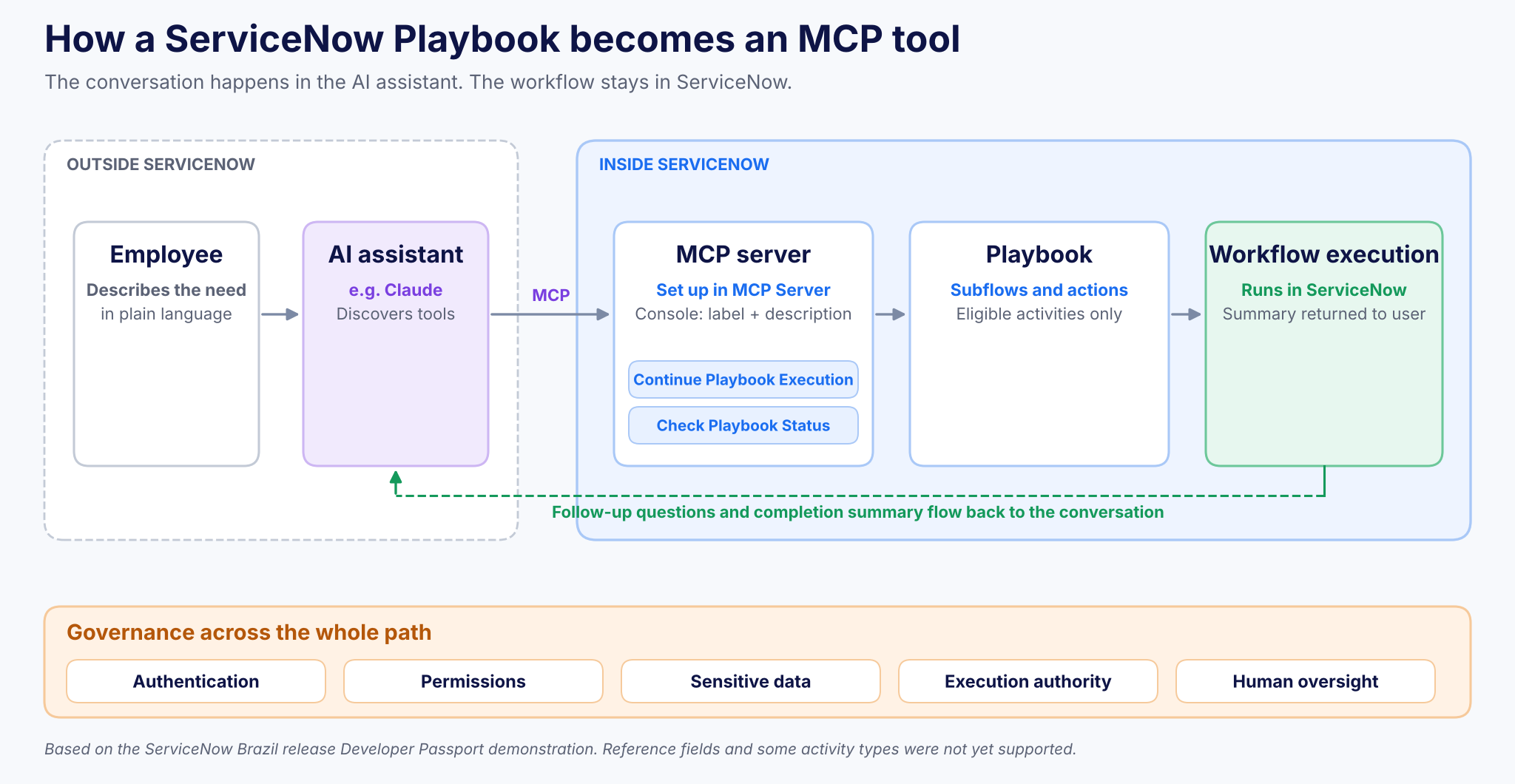
Figure 1. How a ServiceNow Playbook becomes an MCP tool: the conversation is external, the workflow stays in ServiceNow.
The key point: the workflow stays in ServiceNow. The external assistant provides the conversational interface, while ServiceNow keeps managing structured Playbook execution. Enterprises can add new AI interactions without replacing existing workflow investments.
From Conversation to Execution: How It Works
In the ServiceNow Developer Passport Brazil release demonstration, the product team showed an employee expense reimbursement scenario using Claude. The employee needed to submit details after a business trip. Instead of opening a ServiceNow form, they described the request to Claude, which could find and use the reimbursement Playbook because it had been exposed through an MCP server.
Step 1: Understanding the request
The employee described the expense in natural language. Claude identified the available reimbursement Playbook, started processing the request and used details already in the conversation to fill the initial workflow fields.
Step 2: Reusing existing information
Normally the Playbook asks for a short description and more expense details. The employee had already given most of that, so instead of asking again, Claude used the context to move through the relevant activities.
This is one of the most practical benefits of conversational workflow execution: less repetitive data entry.
Step 3: Working with documents
When the workflow needed more information, the employee supplied a document. Claude interpreted it and matched relevant details to the required fields. Where information was missing, it asked follow-up questions.
Step 4: Completing the process
Once the required inputs were in place, Claude continued the Playbook execution and returned a summary of the completed process.
The demonstration illustrates a simple principle: employees should not need to understand every technical step of a workflow to use it. They explain what they need; the connected systems guide the process.
How Developers Expose ServiceNow Playbooks Through MCP
ServiceNow’s implementation extends existing Playbooks rather than requiring new workflows. Administrators configure the integration in the MCP Server Console:
- Select an eligible Playbook
- Define its tool label and description
- Assign it to an MCP server
The tool description matters most: it is how the AI assistant decides when the Playbook is relevant to a user’s request. Write it as clearly as you would a policy or a knowledge article.
Two supporting tools enable the interaction
- Check Playbook Status: lets the assistant inspect the current state of execution
- Continue Playbook Execution: lets the assistant progress through the workflow as information becomes available
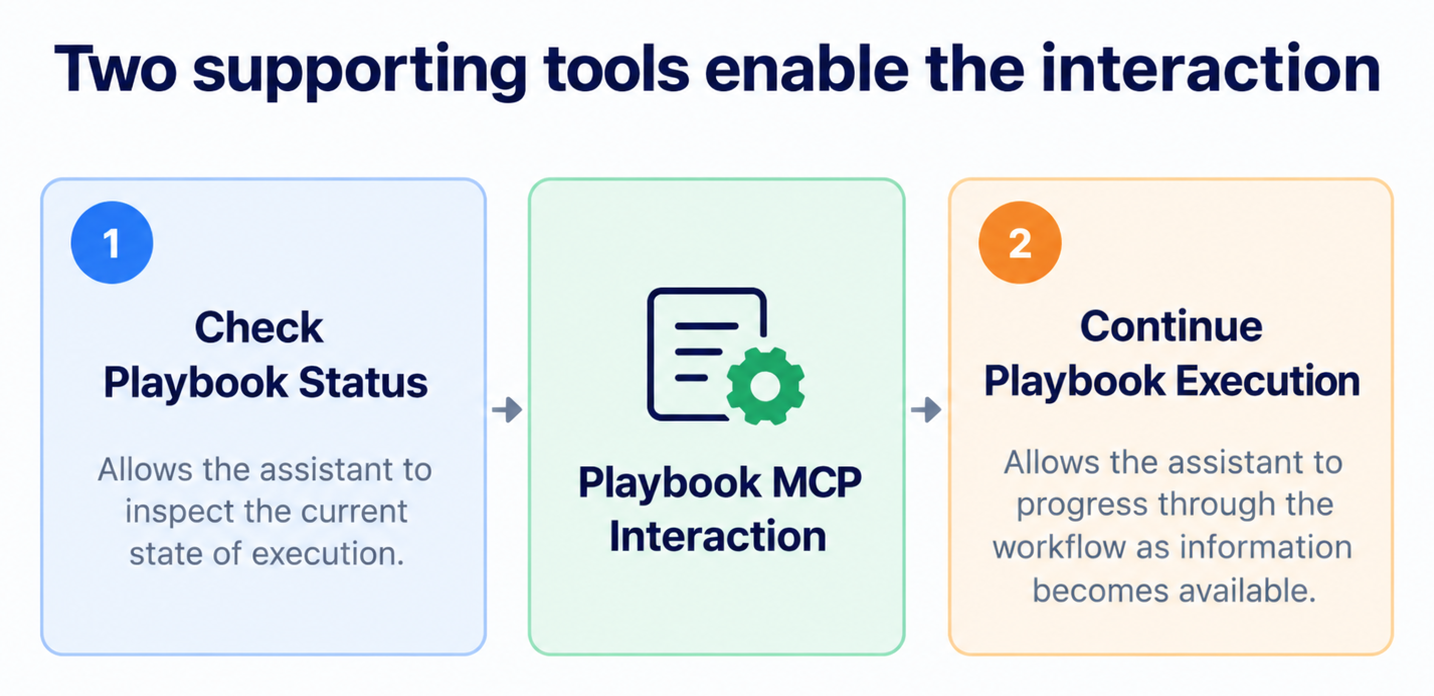
Figure 2. The two supporting tools behind every Playbook MCP interaction.
Together, they support a back-and-forth conversation between the user, the AI assistant and the ServiceNow process.
Conversational Playbooks vs Playbooks as MCP Tools
They are related, but not interchangeable:
| Conversational Playbooks | Playbooks as MCP Tools | |
|---|---|---|
| Where users interact | Supported ServiceNow assistants | External, MCP-compatible AI assistants |
| Configuration | Skills configured for ServiceNow assistants | Dedicated MCP tools and MCP server configuration |
Why MCP Matters for Enterprise AI
MCP is more than another chat interface for ServiceNow. It changes how organizations connect AI assistants to operational systems.
1. Less friction between intent and action
Employees expect software to understand what they want to do. MCP-enabled Playbooks create a path from a natural-language request to structured workflow execution, so users can start from their goal instead of navigating to the right application.
2. Better use of existing workflow investments
Enterprises have invested heavily in ServiceNow process design and automation. MCP adds another way in, so organizations can try conversational access to eligible Playbooks without rebuilding workflows just for an AI assistant.
3. Less repetitive work
Many processes need information employees have already shared in emails, documents or conversations. AI assistants can interpret it and populate supported workflow fields, cutting repetition and improving the experience.
4. A foundation for connected AI experiences
For enterprises experimenting with agentic AI, MCP connects compatible assistants with specific business capabilities. The opportunity is not more AI assistants. It is making assistants useful inside established operational processes.
The Enterprise Reality: Integration Still Requires Governance
The demonstration shows real opportunity, but MCP-based Playbook execution has limits today.
Current limitations (Brazil release)
- Only selected out-of-the-box activity types were supported in the demonstrated implementation
- Reference fields were not yet supported
- ServiceNow discussed plans to expand compatibility in future releases
Check which Playbooks are technically eligible before planning wider adoption.
Governance decisions to make up front
Giving an external AI assistant access to enterprise workflows needs clear decisions on:
- Authentication: how the assistant and user are identified
- Permissions: which tools and Playbooks the assistant can access
- Sensitive data: what information may be transferred outside ServiceNow
- Execution authority: which actions the assistant may complete
- Human oversight: which steps need additional human review
Connecting AI to workflows creates value only when execution stays controlled, reliable and appropriate for the business process. Start with a small set of well-defined workflows with predictable inputs and measurable outcomes. Our Enterprise AI Governance Blueprint for ServiceNow explains how to set ownership, controls and monitoring, and ServiceNow AI Agent Testing: 7 Checks Before Production covers what to test before go-live.
The Teiva Perspective: AI Should Connect to the Work, Not Just Talk About It
At Teiva Systems, we see one of the biggest opportunities in enterprise AI as connecting intelligent assistance to real business execution. Organizations do not need another chatbot that explains where to find a process. They need systems that remove unnecessary effort while preserving established business logic and governance.
ServiceNow Playbooks as MCP Tools are a step in that direction. Exposing existing workflows to compatible AI assistants lets enterprises explore more intuitive employee experiences without abandoning the processes that run their operations.
Implementation priorities
- Identify suitable workflows
- Validate MCP compatibility
- Establish secure access
- Test execution behavior
- Measure the operational improvement
The goal is not to make every workflow conversational. It is to make enterprise work easier to complete.
Key Takeaways
- Brazil release: eligible ServiceNow Playbooks can be exposed as MCP tools
- External AI assistants such as Claude can discover and run them; the workflow stays in ServiceNow
- Setup in the MCP Server Console: select Playbook, write label and description, assign to an MCP server
- Two tools drive the interaction: Check Playbook Status and Continue Playbook Execution
- Current limits: selected activity types only, no reference fields yet
- Decide authentication, permissions, data, execution authority and oversight before go-live
Frequently Asked Questions
What are ServiceNow Playbooks as MCP Tools?
A Brazil release capability that exposes eligible ServiceNow Playbooks through an MCP server, so compatible external AI assistants can discover and run them through natural-language conversation.
Does the workflow run in the AI assistant or in ServiceNow?
In ServiceNow. The AI assistant provides the conversation; ServiceNow keeps managing the structured Playbook execution.
How do you expose a Playbook as an MCP tool?
In the MCP Server Console: select an eligible Playbook, define its tool label and description, and assign it to an MCP server.
Are Conversational Playbooks the same as Playbooks as MCP Tools?
No. Conversational Playbooks use skills configured for supported ServiceNow assistants; MCP integrations need dedicated MCP tools and server configuration.
The Future of Enterprise Workflows Is Action-Oriented
The next stage of enterprise AI will not be defined only by how well assistants answer questions, but by whether they can work with business systems and help users complete meaningful tasks.
ServiceNow Playbooks as MCP Tools show this shift. The workflow stays structured. The interaction becomes conversational. The employee focuses on the outcome, not the process.
For enterprises, the path is clear: connect AI to carefully selected workflows, cut unnecessary manual steps and create a more accessible way to get work done.
The future of enterprise AI is not just better answers. It is turning those answers into action.
Ready to connect your ServiceNow workflows to AI assistants? Talk to Teiva Systems about identifying, securing and testing your first MCP-enabled Playbooks.
Kostya Bazanov, Managing Director, Oct 29, 2026
Eager to take the next step? Contact us today!
Latest Articles
ServiceNow Lux vs UI Builder and Service Portal: What Enterprises Need to Know
Does Lux replace UI Builder or Service Portal? Short answer: no. The full answer depends on what you are building. The way enterprises build experiences on ServiceNow is changing. For years, Service Portal has handled employee and customer self-service, while UI Builder has powered modern workspaces and configurable applications.
read more
Teiva Systems at ServiceNow World Forum 2026 — London
On October 20, 2026, Teiva Systems attended ServiceNow World Forum London at ExCeL London, where industry leaders, technology experts, and the ServiceNow community came together to explore how AI, intelligent automation, and digital workflows are transforming enterprise operations.
read more
ServiceNow Intelligent Approvals: How AI Turns Policies Into Approval Decisions
What if your approval policies could make decisions, instead of sitting in documents waiting for someone to interpret them? For years, approval automation has followed the same pattern. Business teams write policies. Developers translate them into workflow conditions. Employees wait for someone to approve or reject their request, even when the outcome is obvious.
read more