
Your ServiceNow Reports Just Got 2x Faster and You Didn’t Do Anything
Why RaptorDB may be the most valuable Australia release upgrade nobody is talking about
Every headline in the ServiceNow Australia release seems to ask for something: a decision, a budget, an owner, a rollout plan.
- Activate AI Control Tower.
- Configure an AI Specialist.
- Plan for Action Fabric.
- Build the governance model.
- Prepare the adoption campaign.
Then RaptorDB arrived.
No launch theatre. No new dashboard. No six-month change programme.
Just a faster engine underneath the platform — quietly accelerating the work you already do.
“The most important performance upgrade in the Australia release may be the one your users never know happened.”
That is what makes RaptorDB so easy to miss — and so strategically important.
What RaptorDB Actually Changes
RaptorDB is not another feature you open. It is database technology underneath the ServiceNow AI Platform — the layer responsible for storing, retrieving, and processing the records behind your reports, lists, analytics, applications, and workflows.
Previous releases gave users visible change: a new workspace, a redesigned dashboard, a smarter agent. RaptorDB changes the part nobody sees — the part every experience depends on.
- A report returns before the user mentally checks out.
- A large list opens without the familiar pause.
- An analytics query stops feeling like a coffee break.
- A data-heavy workflow spends less time waiting on the database.
There is no new RaptorDB button. The proof is simply that the platform feels faster.
The Performance Story in One Picture
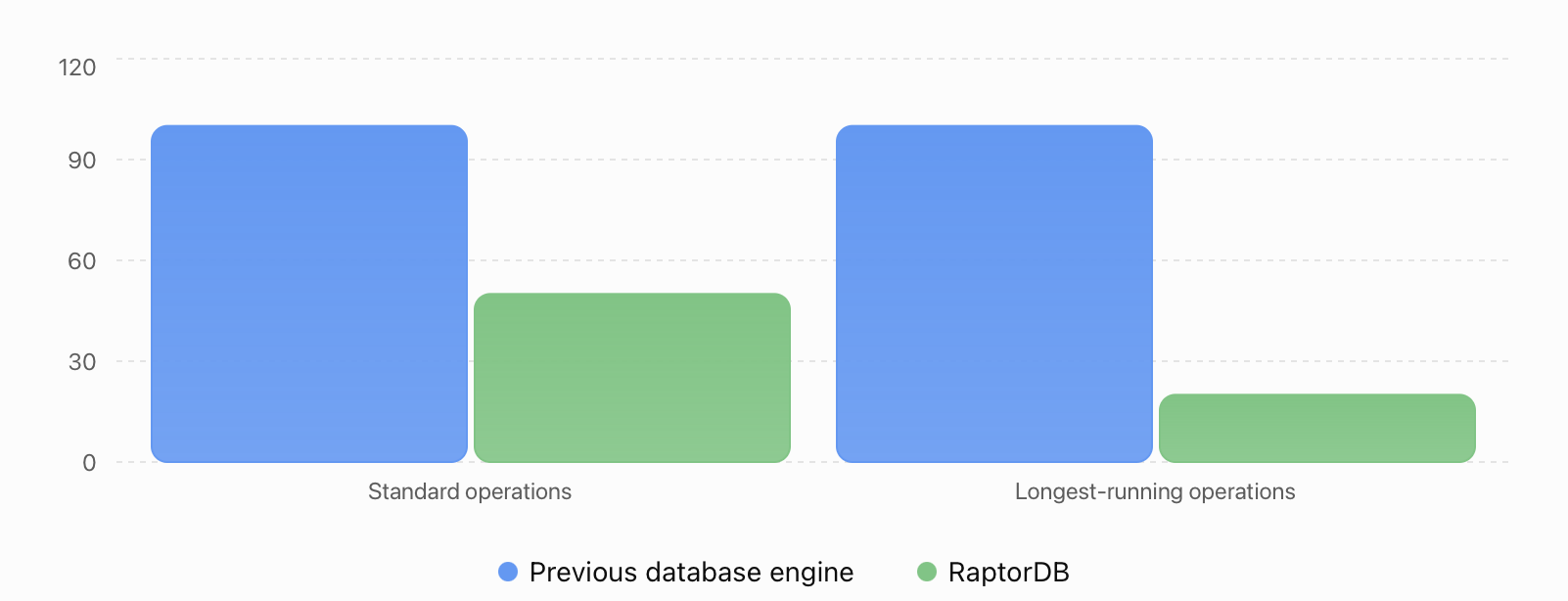
Illustrative normalized execution time: 2x faster reduces 100 units to 50; 5x faster reduces 100 units to 20. Actual results vary by workload, architecture, data volume, and query design.
ServiceNow positions RaptorDB Pro as its high-performance database offering for speed and scale across demanding workflow, analytics, and AI Platform workloads. The exact improvement in any instance will depend on how that instance is built and used.
Why CIOs and Admins May Completely Miss It
Upgrade meetings reward the loudest feature in the room.
- The CIO wants an AI roadmap.
- Security wants AI governance.
- Operations wants to understand Action Fabric.
- The platform team wants to test new agents and workspaces.
Those topics earn slides because they require choices. Database infrastructure rarely does — until it becomes slow enough to become everybody’s problem.
“Performance is invisible when it works. When it fails, it becomes the entire meeting.”
RaptorDB creates the opposite problem: meaningful infrastructure value without a dramatic internal project attached to it. That makes it easy to underestimate — especially in large ServiceNow estates where milliseconds multiply across thousands of daily actions.
A Slow Report Is Not a Small Problem
One report taking 12 seconds does not look like a business crisis. Multiply that delay across an enterprise and the cost changes shape.
| 500 users | |
| × 10 data-heavy actions per day | |
| × 6 avoidable seconds | |
| = 30,000 seconds lost daily | More than 8 hours of accumulated waiting |
The lost time matters. The changed behaviour matters more.
- Employees stop opening dashboards.
- Managers export data to Excel “just this once.”
- Teams build duplicate reporting pipelines.
- Admins inherit complaints and workarounds.
- The platform quietly loses trust.
Performance is not merely technical polish. It is an adoption feature.
Why RaptorDB Becomes More Important as AI Scales
ServiceNow is no longer processing only human-generated work. AI agents are reading context, evaluating records, triggering actions, and participating in increasingly autonomous workflows.
The chain is simple: more AI agents → more actions → more data → more queries → more pressure on the database.
Every intelligent experience depends on fast access to trusted data. The AI layer may be what executives see, but the database layer determines whether that vision operates efficiently at enterprise scale.
“You cannot build an autonomous enterprise on a data layer designed for yesterday’s workflow volume.”
That is why RaptorDB should be read as more than a database upgrade. It is part of the foundation behind the broader ServiceNow AI Platform strategy.
The Catch: Faster Infrastructure Does Not Erase Technical Debt
A faster engine can make inefficient architecture move faster. It cannot make it good architecture.
- An inefficient query is still inefficient.
- An overloaded business rule is still overloaded.
- A poorly designed custom application is still difficult to maintain.
- A chaotic reporting model is still chaotic — only quicker.
The smart response is not to celebrate and move on. It is to use the Australia upgrade as a clean point for a new performance baseline.
Five Things to Measure After the Upgrade
| # | What to do | Why it matters | Specifically in ServiceNow |
| 1 | Benchmark critical reports | Test the 10–20 reports that matter most to operational and executive users — before and after RaptorDB activation. | Performance Analytics — compare average query times before and after upgrade. Look for the longest-running reports first. |
| 2 | Review long-running transactions | Find the operations where every second saved has a visible business impact: large CMDB queries, complex approval workflows, multi-table reports. | Navigate to System Diagnostics → Stats → SQL. Sort by execution time. The worst offenders are your highest-value targets. |
| 3 | Stress-test data-heavy workspaces | Focus on large task lists, CMDB visualisations, asset management dashboards, and operational datasets that previously felt sluggish. | Test in a sub-production clone at production data volumes. RaptorDB’s gains are most visible under load, not in empty development instances. |
| 4 | Revisit old workarounds | Some Excel exports and external reporting pipelines exist only because ServiceNow once felt too slow. Those may now be unnecessary. | Survey your heaviest users: “Which reports do you run outside ServiceNow?” Each one is a trust gap that RaptorDB may have just closed. |
| 5 | Establish the new performance baseline | Do not design tomorrow’s architecture around assumptions created three releases ago. Re-document your performance benchmarks post-upgrade. | Update your instance health benchmarks in Automated Test Framework. Run a full performance pass within 30 days of upgrade completion. |
Teams preparing for the upgrade should also review the official ServiceNow latest release overview and use their own instance telemetry to validate the effect rather than relying on a single headline number.
The Bigger Lesson: Stop Measuring Releases by Feature Count
Enterprise technology teams love counting what is new: new agents, new dashboards, new integrations, new controls. But infrastructure improvements create value across what is already deployed.
- Reports.
- Lists.
- Analytics.
- Applications.
- Workflows.
- And increasingly, AI agents.
RaptorDB does not need every employee to learn a new tool. It improves the foundation supporting the tools they already use. That may make it less visible — but not less valuable.
What Should ServiceNow Leaders Do Next?
Do not create a transformation programme for RaptorDB simply because transformation programmes are familiar. Instead, measure what changed, retire assumptions that are no longer true, and identify where faster data access can remove friction from reporting, analytics, workflows, and AI operations.
At Teiva Systems, we help enterprises evaluate ServiceNow architecture, performance, and scalability as the platform moves toward AI-driven operations. The Australia release is not only an invitation to activate new capabilities. It is a chance to ask whether your existing architecture is ready for the next level of data, workflow, and agent volume.
The flashiest release feature may win the meeting. The fastest foundation may win the year.
Slava Trotsenko, CEO, Jul 20, 2026
Eager to take the next step? Contact us today!
Latest Articles

ServiceNow Lux: How the New AI-First UI Framework Changes Application Development
ServiceNow Lux: How the New AI-First UI Framework Changes Application Development AI is no longer just a feature inside enterprise software. It is becoming part of the interface itself. For years, ServiceNow developers have built applications around forms, workspaces, dashboards and structured workflows. AI arrived as add-ons: search, record summaries, automation of specific tasks. ServiceNow […]
read more
Teiva Systems at ServiceNow Developer Meetup Munich: Exploring AI-Powered Platform Operations
On October 29, 2026, Teiva Systems participated in the ServiceNow Developer Meetup (SNUG) in Munich, hosted by Agineo. The event brought together ServiceNow developers, architects, and technology enthusiasts to explore the latest platform innovations, AI-powered automation, and the future of autonomous ServiceNow operations.
read more
ServiceNow Playbooks as MCP Tools: Connecting Enterprise Workflows to AI Assistants
Imagine an employee opening Claude, describing a business trip, attaching a receipt and asking for reimbursement. No switching applications. No hunting for the right ServiceNow form. No typing the same information twice.
read more