
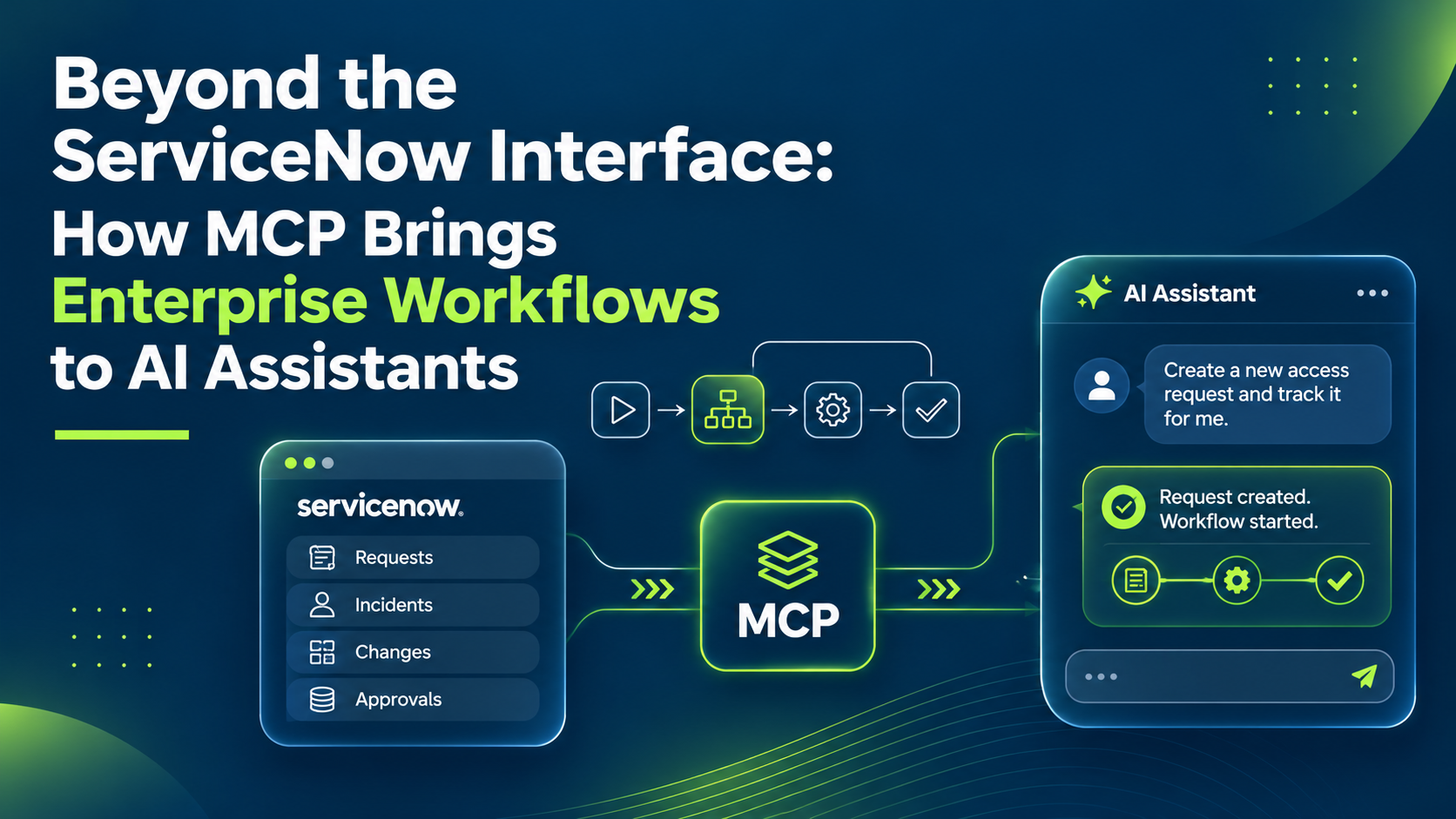
Beyond the ServiceNow Interface: How MCP Brings Enterprise Workflows to AI Assistants
What if your AI assistant could do more than answer questions about your enterprise systems? What if it could actually get work done inside them?
Imagine asking an AI assistant to investigate a critical incident, check affected infrastructure, identify the responsible team and start the right ServiceNow workflow, without opening the ServiceNow interface or navigating several applications.
This is no longer just a vision. With the Model Context Protocol (MCP), organizations can connect AI assistants directly to approved enterprise tools and workflows, creating a new way to work with the ServiceNow AI Platform.
The result: ServiceNow becomes more than an application employees use. It becomes a governed system of action that AI assistants can invoke.
In this article:
- What MCP is and why it matters for ServiceNow
- How a request flows from an AI assistant into ServiceNow
- MCP Server, MCP Client and the MCP Registry
- Five enterprise use cases, security essentials and a six-step start plan
The Problem: Enterprise AI Can Talk, but Can It Act?
Enterprise AI assistants are good at understanding questions, generating insights, summarizing documents and supporting decisions. But understanding a request is different from executing it.
Example: an IT operations question
An employee asks: “Why is our payment application experiencing performance issues, and what is being done to resolve them?”
Without access to operational systems, the assistant can only offer general troubleshooting advice. It cannot reliably:
- Inspect the actual incident
- Identify affected configuration items
- Retrieve the latest investigation notes
- Start an approved remediation process
Someone still has to open ServiceNow, search records, review the CMDB, investigate dependencies and coordinate next steps. The intelligence exists, but the connection to enterprise action is missing.
Traditional integrations solve parts of this, but often need custom development, application-specific APIs and ongoing maintenance. MCP introduces a standard way to connect AI applications with the tools and context they need.
What Is MCP, and Why Does It Matter for ServiceNow?
The Model Context Protocol (MCP) is an open standard that lets AI applications discover and interact with external tools, services and data sources through a common interface. Instead of building a separate integration for every AI assistant, organizations expose approved capabilities through MCP servers. A compatible assistant discovers the tools, understands their purpose and invokes them when appropriate.
For ServiceNow, selected capabilities become available in conversational AI experiences, not only through forms, lists and dashboards. An assistant could be authorized to:
- Retrieve incidents and summarize their status
- Search knowledge articles for resolution procedures
- Investigate configuration items and service dependencies
- Create or update requests through approved workflows
- Trigger predefined automation and approval processes
- Retrieve project or service information for operational reporting
Each action still depends on the tools exposed, the user’s permissions and the organization’s security policies.
MCP does not replace ServiceNow’s business logic. It provides a standard way for AI assistants to access it. That distinction is critical for enterprise adoption.
ServiceNow Is No Longer Limited to Its Own Interface
Employees have typically used ServiceNow through application interfaces, portals, integrations and embedded experiences. MCP adds another model: an employee in an MCP-compatible AI assistant can request information or start an approved ServiceNow process without switching interfaces.
Example: “Show me the high-priority incidents affecting our customer-facing applications and summarize which ones need escalation.” The assistant uses approved ServiceNow tools to retrieve the incidents, examine their context and prepare a prioritized summary, in the same conversation. An authorized assistant could go further: prepare an escalation, start a workflow or request approval for the next step.
Instead of asking employees to navigate each system, organizations bring selected system capabilities into the experiences employees already use.
The ServiceNow platform remains the system of action
AI assistants do not independently take control of enterprise operations. ServiceNow keeps managing records, workflows, business rules, access controls and operational processes:
- The assistant provides conversation and reasoning
- ServiceNow provides the governed execution environment
AI determines which approved capability to request. ServiceNow controls how that capability is executed. This separation is what makes the architecture valuable for enterprises.
How MCP Connects AI Assistants to ServiceNow
An AI assistant communicates with an MCP server that exposes approved tools. Those tools connect to ServiceNow capabilities, so the assistant can retrieve information or start supported operations. A typical interaction has five stages:
- A user makes a request: for example, investigate an incident or prepare a service request.
- The assistant discovers available tools: through MCP, it sees the tools the configured server offers.
- The assistant selects a tool: based on the request and the tool descriptions.
- ServiceNow processes the operation: subject to authentication, access controls, business logic and other safeguards.
- The assistant presents the result: and may propose next steps or ask for confirmation.
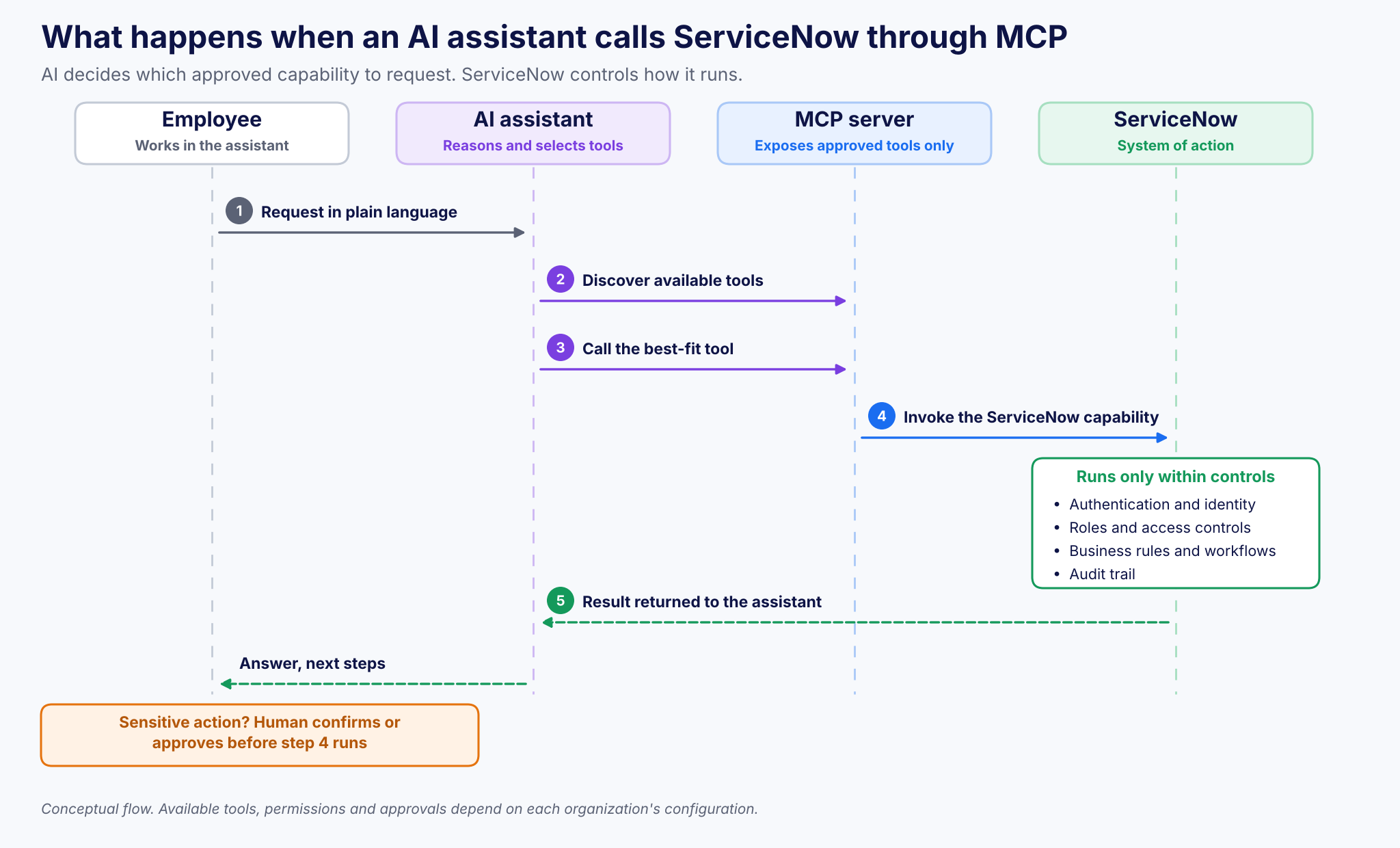
Figure 1. What happens when an AI assistant calls ServiceNow through MCP.
Organizations expose capabilities selectively, instead of granting an assistant unrestricted access to the platform.
MCP Server, MCP Client and MCP Registry
ServiceNow supports two MCP integration patterns, plus a registry to govern them:
| Component | Direction | What it does |
|---|---|---|
| ServiceNow MCP Server (MCP Server Console) | AI assistants → ServiceNow | Exposes selected ServiceNow capabilities to external AI assistants |
| ServiceNow MCP Client | ServiceNow → external tools | Lets ServiceNow AI agents interact with approved external MCP servers |
| MCP Registry | Governance | Helps discover and govern approved MCP servers |
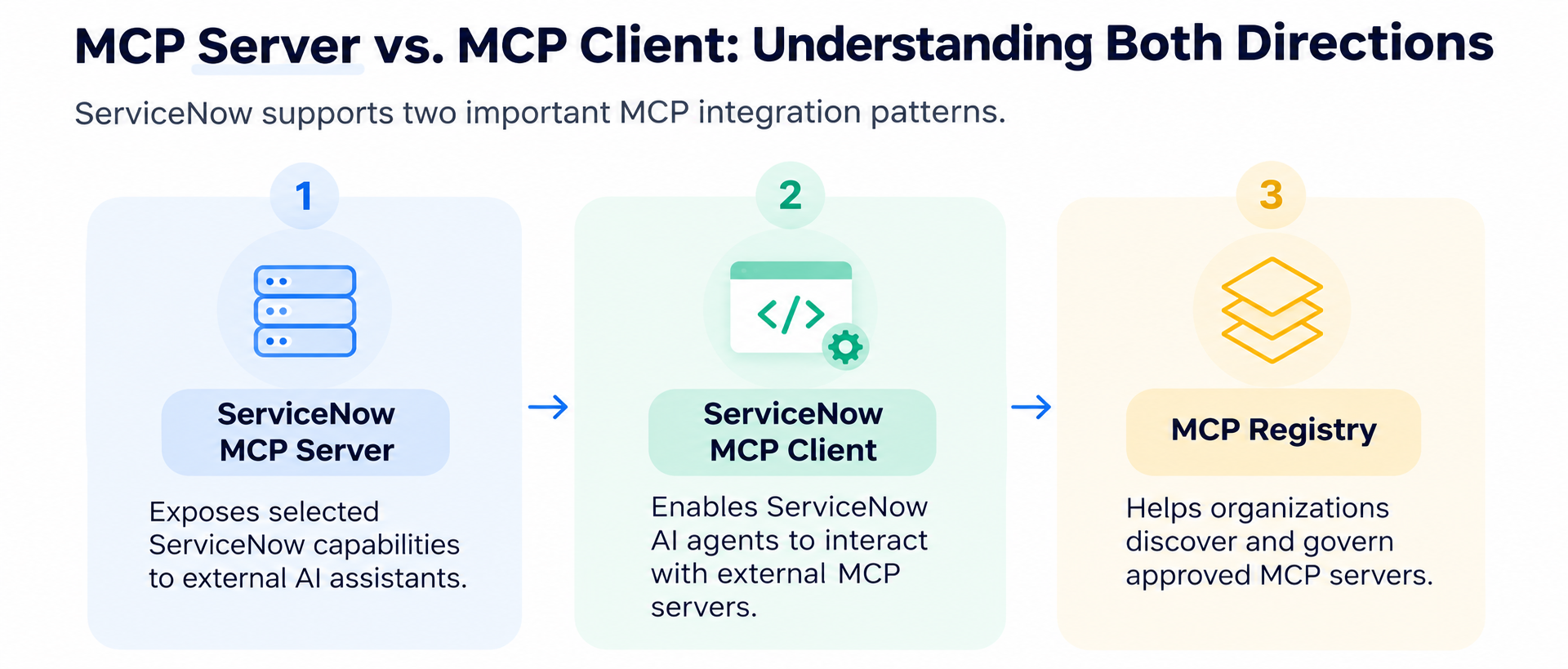
Figure 2. ServiceNow MCP Server, MCP Client and MCP Registry.
This bidirectional model is especially significant. AI assistants outside ServiceNow can request approved actions inside the platform, while ServiceNow AI agents can reach external tools for cross-system workflows. The opportunity is not one chatbot connected to one application, but a coordinated environment where AI systems can access the capabilities a business process needs.
Five Enterprise Use Cases That Make MCP Valuable
| Use case | Example request | Business impact |
|---|---|---|
| Incident management | Find critical incidents and recurring problems | Faster incident context, consistent handoffs |
| IT operations | What is affected if this database server goes down? | Faster impact analysis |
| Employee services | I need access to the project management app | Less friction, controls intact |
| Change management | Summarize weekend changes and conflicts | Better change visibility |
| Cross-system workflows | Correlate ServiceNow, GitHub and Teams for an incident | Fewer system switches |
1. Incident management: from questions to resolution workflows
An IT support engineer asks: “Find the critical incidents affecting our production services and identify any recurring problems.” An MCP-enabled assistant retrieves authorized incident information, reviews history and helps identify patterns. With more capabilities available, it could prepare escalation details or start a predefined investigation workflow.
Business impact: less manual navigation, faster access to incident context, more consistent handoffs.
2. IT operations: connecting infrastructure context to AI
A service owner asks: “Which business services could be affected if this database server becomes unavailable?” Using authorized CMDB and service-mapping capabilities, the assistant retrieves configuration and dependency information and gives a consolidated view of potential impact. Accuracy depends on the quality and completeness of the CMDB data.
Business impact: faster impact analysis and better-informed operational decisions.
3. Employee services: making requests more conversational
An employee asks: “I need access to our project management application for the new client engagement.” An authorized assistant identifies the catalog item, collects the required information and starts the request. If managerial approval is needed, the request continues through the established approval workflow.
Business impact: less friction for employees, without bypassing organizational controls.
4. Change management: better-informed decisions
A release manager asks: “Summarize the changes scheduled for this weekend and highlight potential conflicts.” The assistant retrieves approved change information and configuration context, produces a structured summary and flags possible overlaps for review. Scheduling decisions and approvals stay in the established change-management process.
Business impact: better change visibility and more efficient preparation for approval meetings.
5. Cross-system workflows: connecting ServiceNow to the wider enterprise
A development team handles a production issue across ServiceNow, GitHub and Microsoft Teams. With appropriately configured MCP connections, an AI workflow could:
- Retrieve the incident and its status from ServiceNow
- Get relevant repository or deployment information from an approved development tool
- Correlate the findings and prepare a technical summary
- Update the incident through an authorized ServiceNow operation
- Send a status update through an approved communication tool
The value is not automating one task. It is connecting the steps of a business process that used to require moving between disconnected systems. Actual execution depends on each system’s tools, permissions and workflow configuration.
Why MCP Is More Than Another API Integration
ServiceNow already offers REST APIs, IntegrationHub and workflow automation. MCP solves a different part of the problem:
| Traditional APIs | MCP | |
|---|---|---|
| Who calls it | Developers write code for each operation | AI applications discover and choose tools |
| What it describes | Endpoints and parameters | Tools with descriptions and input requirements |
| Per-question work | Custom logic per scenario | Assistant selects from approved tools |
MCP does not remove the need for good integration architecture. An MCP server exposing poorly designed tools simply reproduces the limits of an existing API integration. The value comes from exposing meaningful enterprise capabilities.
Example: instead of giving an assistant unrestricted access to modify incident records, expose a purpose-built tool that performs a validated escalation. It applies predefined conditions, enforces required inputs and uses established ServiceNow workflows.
The goal is business-aware actions, not unrestricted database access.
Security and Governance: The Foundation of Enterprise MCP
A conversational interface may feel simple to the employee, but the systems behind it hold sensitive information and run business-critical operations. Enterprise MCP must be built around trust, permissions and control.
Identity and access management
AI assistants should operate through authenticated connections with explicitly defined permissions. Tool availability and execution must respect identity, authorization and ServiceNow access controls.
Least-privilege tool exposure
Expose only the capabilities needed for a specific purpose. A support assistant may retrieve incidents and propose updates without being able to change security settings or run arbitrary scripts.
Human approval for sensitive actions
High-impact actions such as production changes, privileged access requests or sensitive record changes should follow confirmation and approval procedures.
Monitoring and auditability
Track which tools are called, which identities make requests, what actions occur and whether they succeed.
Protection against untrusted content
Tool responses and external information may contain misleading or malicious instructions. AI systems must treat retrieved content as data, not as an authorized command.
MCP provides a communication standard; it does not make every connected tool secure. Enterprise-grade MCP needs carefully designed tools, strong authentication, policy enforcement, monitoring and governance. Our Enterprise AI Governance Blueprint for ServiceNow covers how to set this up.
How to Start Building MCP-Powered ServiceNow Experiences
You do not need to expose your whole ServiceNow environment on day one. Start focused and expand step by step:
Step 1: Identify a high-value workflow
Pick a process where employees repeatedly switch between an AI assistant and ServiceNow. Incident summarization, knowledge retrieval and service-request preparation are good starting points.
Step 2: Define the tools the assistant needs
Turn the workflow into a small set of well-defined operations, each with a clear purpose, predictable inputs and an understandable response. Start read-only before adding actions that change enterprise data.
Step 3: Choose the MCP architecture
- MCP Server Console: external assistants need access to ServiceNow capabilities
- MCP Client: ServiceNow AI agents need approved external MCP servers
- MCP Registry: manage server discovery and approval where relevant
Step 4: Configure authentication and controls
Set up authentication, role permissions, access controls and approval processes. Confirm the assistant can reach only the capabilities it is meant to use.
Step 5: Test real business scenarios
Check whether the assistant picks the right tool, understands results, handles missing data and responds safely when permissions or dependencies block an action. Test failures as well as successes (see ServiceNow AI Agent Testing: 7 Checks Before Production).
Step 6: Measure operational results
- Time to complete common tasks
- Reduction in manual application switching
- Percentage of requests completed successfully
- Tool execution accuracy and failure rates
- Frequency of human intervention
- Compliance with approval requirements
The objective is not the most AI-generated actions. It is better business outcomes with control maintained.
The Future of ServiceNow: Workflows Without Interface Boundaries
Traditional enterprise software assumes employees open an application to use it. MCP challenges that. As AI assistants become a common entry point for work, employees may increasingly use enterprise systems through conversations instead of individual screens.
ServiceNow’s role stays essential: its workflows, service data, automation and governance turn an AI-generated request into a controlled business action. The interface does not disappear; complex investigations, configuration, oversight and specialist work still benefit from dedicated platform experiences. What changes is that the interface is no longer the only way to start work.
The next generation of enterprise AI will not just explain what needs to happen. It will help start, coordinate and complete work across connected business systems. MCP is an important foundation for that transition.
Key Takeaways
- MCP is an open standard that lets AI assistants discover and use approved tools
- ServiceNow stays the system of action: AI requests, ServiceNow controls execution
- MCP Server exposes ServiceNow to assistants; MCP Client lets ServiceNow agents use external tools; the Registry governs both
- Expose purpose-built, business-aware tools, not raw data access
- Security needs identity, least privilege, approvals, auditing and untrusted-content protection
- Start read-only with one high-value workflow, then measure and expand
Frequently Asked Questions
What is MCP in ServiceNow?
The Model Context Protocol is an open standard that lets AI applications discover and use external tools through a common interface. With ServiceNow, organizations can expose approved platform capabilities to MCP-compatible AI assistants.
What is the difference between ServiceNow MCP Server and MCP Client?
MCP Server Console exposes selected ServiceNow capabilities to external AI assistants. MCP Client lets ServiceNow AI agents use approved external MCP servers. The MCP Registry helps discover and govern approved servers.
Does MCP replace ServiceNow APIs or IntegrationHub?
No. APIs expose operations developers call; MCP gives AI applications a standard way to discover tools, understand their inputs and invoke them. Good integration design is still needed.
Is MCP secure for enterprise use?
MCP is a communication standard and does not make tools secure by itself. Enterprise use needs authentication, least-privilege tools, human approval for sensitive actions, monitoring and protection against untrusted content.
How Teiva Systems Helps Organizations Build AI-Connected ServiceNow Workflows
At Teiva Systems, we help organizations extend the ServiceNow AI Platform through custom application development, integrations and intelligent automation. With MCP and agentic AI, the challenge goes beyond connecting an assistant to a server. It needs a clear understanding of ServiceNow architecture, business processes, access controls and the outcome each AI capability should deliver. We help organizations:
- Assess workflows for MCP and AI assistant integration opportunities
- Design purpose-built tools that expose the right platform capabilities
- Build and extend integrations between ServiceNow and enterprise AI ecosystems
- Implement secure, maintainable automation with appropriate governance
- Test and optimize AI-connected workflows for real business requirements
The opportunity is not to replace ServiceNow with AI. It is to make ServiceNow’s enterprise capabilities accessible wherever intelligent work begins.
Ready to explore how MCP can connect your ServiceNow workflows to AI assistants? Contact Teiva Systems to discuss your integration and AI automation strategy.
Slava Trotsenko, CEO, Nov 16, 2026
Eager to take the next step? Contact us today!
Latest Articles
ServiceNow Developer Sandboxes and CI/CD: Automating Development Environments with REST APIs
What if every ServiceNow development task could start with its own isolated environment, connect to a CI/CD pipeline, and disappear when the work is done?
read more
ServiceNow Developer Sandboxes: What’s New in the Brazil Release
Faster sandbox allocation, simpler configuration, automated lifecycle management and safer parallel development: here is what ServiceNow’s Brazil release changes for developers and enterprise teams.
read more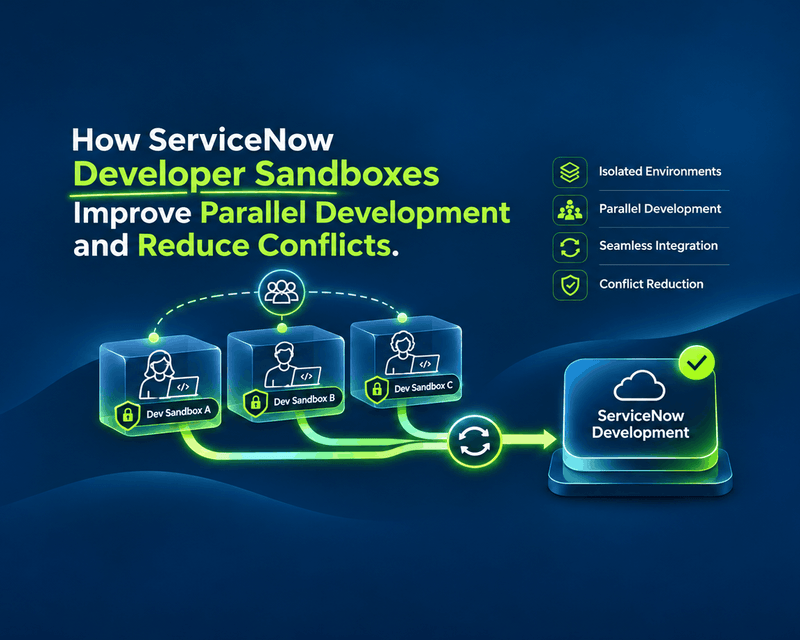
How ServiceNow Developer Sandboxes Improve Parallel Development and Reduce Conflicts
What happens when five developers work on the same ServiceNow application at once? One updates a business rule. Another modifies a workflow. A third adds an integration. Meanwhile, someone is fixing a critical production issue.
read more